Short answer: a Claude Code hook is a shell command that Claude Code runs automatically at a fixed point, such as before a tool call (PreToolUse), after a file edit (PostToolUse) or when Claude finishes a turn (Stop). You add hooks to .claude/settings.json, the hook reads a JSON event on stdin, and exit code 2 blocks the action and tells Claude why. Use hooks for rules that must hold every single time; keep everything else in CLAUDE.md or a skill.
Last updated: October 19, 2026. Grounded in the official hooks guide, hooks reference and permissions docs. Every script below was checked by piping sample hook JSON into it and confirming the exit code.
Here is the pattern I see over and over in r/ClaudeCode threads and on X this month: someone adds a rule to CLAUDE.md (“never touch .env”, “run the tests before you say done”), the agent follows it for a while, then quietly skips it after a long session or a compaction. The fix people keep landing on is the same. A line in CLAUDE.md is a request. A hook is enforced by the harness, not by the model’s memory.
This post is the practical follow-up to the hooks section in my skills guide. You get ten hooks that actually matter for a one-person SaaS, a combined settings.json you can paste, and the mistakes that turn a helpful hook into a token furnace.
Hooks vs CLAUDE.md vs permissions (pick the right tool)
Before writing any hook, check whether a simpler tool already does the job.
| Tool | What it is | Enforced? | Use it for |
|---|---|---|---|
| CLAUDE.md | Instructions loaded into context | No, the model can forget | Stack facts, conventions, “how we do things” |
| Skill | A reusable procedure Claude loads on demand | No | Release notes, launch posts, audits |
| Permission rules | allow / ask / deny lists in settings | Yes | Blocking reads of .env, pre-approving npm test |
| Hook | Your script on a lifecycle event | Yes | Anything that needs logic: formatting, checks, gates, alerts |
My rule of thumb: if breaking the rule once costs real money or data, it’s a permission rule or a hook. If I’ve corrected the same mistake twice, it becomes a hook. And when a permission rule can express it, use the rule. The official docs are blunt that the if filter on hooks is best-effort, and they point you to the permission system for hard allow/deny.
How a hook works in 60 seconds
Every hook lives under a single hooks key in a settings file. Each event (PreToolUse, PostToolUse, Stop, and about 30 others) holds a list of matcher groups, and each group holds one or more handlers:
{
  "hooks": {
    "PostToolUse": [
      {
        "matcher": "Edit|Write",
        "hooks": [{ "type": "command", "command": "echo edited >&2" }]
      }
    ]
  }
}
The three things you need to remember:
- Input: Claude Code sends JSON on stdin. For tool events you get
tool_nameandtool_input(for exampletool_input.file_pathfor edits andtool_input.commandfor Bash). - Exit 0 means “no objection”. On
PreToolUsethat does not approve anything; the normal permission prompt still applies. - Exit 2 blocks the action where the event can be blocked, and your stderr becomes the explanation. On
PostToolUsethe tool already ran, so exit 2 just shows your stderr to Claude, which is still very useful.
Where you put the file decides the scope: ~/.claude/settings.json for all your projects, .claude/settings.json to commit it with the repo, .claude/settings.local.json for personal project-only hooks. Type /hooks inside Claude Code to see what’s loaded.
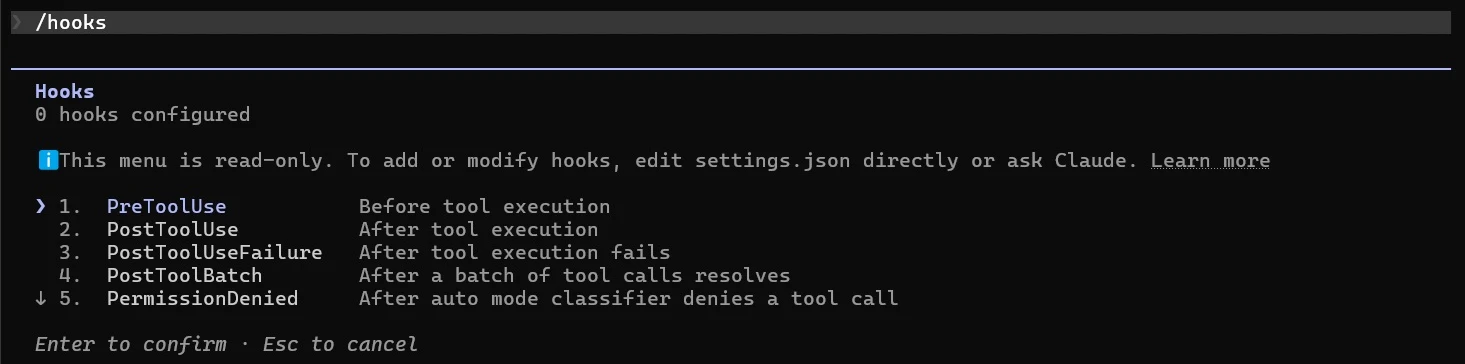
Most examples use jq to parse JSON. Install it first (brew install jq or apt-get install jq), and chmod +x every script you save under .claude/hooks/.
The 10 hooks
1. Ping me when Claude needs input
The one everybody installs first, and for good reason. Once you run more than one session, the bottleneck is knowing which one is waiting on you. Put this in ~/.claude/settings.json (macOS shown; on Linux swap the command for notify-send 'Claude Code' 'Needs your attention'):
{
  "hooks": {
    "Notification": [
      {
        "matcher": "permission_prompt|idle_prompt",
        "hooks": [
          {
            "type": "command",
            "command": "osascript -e 'display notification \"Claude Code needs your attention\" with title \"Claude Code\"'"
          }
        ]
      }
    ]
  }
}
permission_prompt fires when an approval has waited about six seconds, and idle_prompt fires about a minute after Claude finished and you haven’t typed. Pitfall: on macOS, if nothing shows up, Script Editor doesn’t have notification permission. Run osascript -e 'display notification "test"' once, then allow Script Editor in System Settings > Notifications.
2. Auto-format every file Claude edits
{
  "hooks": {
    "PostToolUse": [
      {
        "matcher": "Edit|Write",
        "hooks": [
          { "type": "command", "command": "command -v jq >/dev/null 2>&1 || { echo 'Format hook skipped: jq not installed' >&2; exit 0; }; jq -r '.tool_input.file_path' | xargs npx prettier --write" }
        ]
      }
    ]
  }
}
This keeps diffs clean and stops the “fix formatting” back-and-forth. Two caveats. First, it only sees the Edit and Write tools; if Claude rewrites a file with a Bash command (sed -i, a codegen script), this hook never fires. Second, Prettier will happily try to format files it doesn’t understand, so if you see hook errors on .sql or .env.example files, add a .prettierignore.
3. Block edits to secrets, lockfiles and migrations
Save as .claude/hooks/protect-files.sh:
#!/bin/bash
# Block edits to secrets, lockfiles and git internals. Exit 2 = block + tell Claude why.
# Fail closed: without jq, FILE_PATH would be empty and every edit would slip through.
command -v jq >/dev/null 2>&1 || { echo "Hook needs jq. Install it (Windows: winget install jqlang.jq) before editing protected files." >&2; exit 2; }
INPUT=$(cat)
FILE_PATH=$(echo "$INPUT" | jq -r '.tool_input.file_path // empty')
FILE_PATH="${FILE_PATH//\\//}"   # normalize Windows separators

PROTECTED=(".env" ".pem" "id_rsa" "package-lock.json" "pnpm-lock.yaml" ".git/" "supabase/migrations/")

for p in "${PROTECTED[@]}"; do
  if [[ "$FILE_PATH" == *"$p"* ]]; then
    echo "Blocked: $FILE_PATH is protected ($p). Tell the user what you wanted to change instead." >&2
    exit 2
  fi
done
exit 0
The command -v jq line makes it fail closed: if jq is missing, every edit is blocked with an install hint instead of silently allowed (I learned this the hard way; see debugging). After installing jq, I confirmed it blocks .env edits on Windows. Register it as a PreToolUse hook with the Edit|Write matcher (see the combined config below). I include supabase/migrations/ because an agent “fixing” an already-applied migration is one of the quietest ways to break production; new migrations should be new files that you review.
Important: this blocks edits, not reads. To stop Claude from reading your keys at all, add permission deny rules. The permissions docs also note that a .claudeignore file has no effect, so don’t rely on one:
{
  "permissions": {
    "deny": ["Read(./.env)", "Read(./.env.*)", "Read(./secrets/**)"]
  }
}
If you’re about to launch, pair this with the rest of my vibe-coded app security checklist.
4. Guard against dangerous shell commands
This one uses JSON output instead of exit 2, which lets you give Claude a clean reason. Save as .claude/hooks/bash-guard.sh:
#!/bin/bash
# Deny a short list of shell commands that can wreck a solo project.
# Fail closed: without jq this guard can't read the command, so block until jq is installed.
command -v jq >/dev/null 2>&1 || { echo "Hook needs jq. Install it (Windows: winget install jqlang.jq) before running shell commands." >&2; exit 2; }
INPUT=$(cat)
CMD=$(echo "$INPUT" | jq -r '.tool_input.command // empty')

deny() {
  jq -nc --arg r "$1" '{hookSpecificOutput: {hookEventName: "PreToolUse", permissionDecision: "deny", permissionDecisionReason: $r}}'
  exit 0
}

echo "$CMD" | grep -Eq 'rm -rf (/|~|\$HOME|\.)( |$)' && deny "rm -rf on a root, home or project directory is not allowed. Delete specific paths instead."
echo "$CMD" | grep -Eq 'git push .*(--force|-f)( |$)' && deny "Force pushes are not allowed. Push a new commit or ask the user."
echo "$CMD" | grep -Eiq 'drop (table|database)|truncate table' && deny "Destructive SQL is not allowed from the agent. Write a migration and ask the user to review it."
echo "$CMD" | grep -Eq '(supabase db reset|prisma migrate reset)' && deny "Database resets wipe data. Ask the user first."
exit 0
In my checks it denied rm -rf ., git push -f origin main, a DROP TABLE inside psql -c, and npx supabase db reset, while letting rm -rf ./dist, git push origin main and npm test through.
Be honest with yourself about what this is: a seatbelt, not a sandbox. Pattern matching on shell strings can always be dodged by a creative command. One useful property, straight from the docs: a PreToolUse deny still blocks even in bypassPermissions mode or with --dangerously-skip-permissions. If you ever run in YOLO mode, this hook is the thing still standing.
5. Feed TypeScript errors straight back to Claude
Save as .claude/hooks/typecheck.sh and register it under PostToolUse with Edit|Write:
#!/bin/bash
# After a .ts/.tsx edit, run the type checker and hand errors back to Claude.
command -v jq >/dev/null 2>&1 || { echo "Typecheck hook skipped: jq not installed (Windows: winget install jqlang.jq)." >&2; exit 0; }
INPUT=$(cat)
FILE_PATH=$(echo "$INPUT" | jq -r '.tool_input.file_path // empty')
[[ "$FILE_PATH" == *.ts || "$FILE_PATH" == *.tsx ]] || exit 0

cd "$CLAUDE_PROJECT_DIR" || exit 0
OUT=$(npx --no-install tsc --noEmit --pretty false 2>&1)
if [ $? -ne 0 ]; then
  echo "TypeScript errors after editing $FILE_PATH (first 20 lines):" >&2
  echo "$OUT" | head -20 >&2
  exit 2   # PostToolUse can't undo the edit; exit 2 shows this to Claude
fi
exit 0
Against a file with const n: number = "x", the hook exited 2 and passed the TS2322 error back; after the fix it exited 0. The head -20 matters. Dumping 400 lines of compiler output into the conversation after every edit eats your context window, which is exactly the problem my token usage guide is about. On a big project a full tsc run on every edit is also slow; if it hurts, move this check to the Stop gate below instead.
6. A test gate on Stop (with the loop guard)
This is the hook that makes “done” mean done. Save as .claude/hooks/stop-test-gate.sh:
#!/bin/bash
# Don't let Claude say "done" while tests fail. Runs once per stop attempt.
# Without jq the loop guard below can't work, so warn and let Claude stop instead of looping forever.
command -v jq >/dev/null 2>&1 || { echo "Test gate skipped: jq not installed (Windows: winget install jqlang.jq)." >&2; exit 0; }
INPUT=$(cat)

# Loop guard: if we already sent Claude back once, let it stop.
if [ "$(echo "$INPUT" | jq -r '.stop_hook_active // false')" = "true" ]; then
  exit 0
fi

cd "$CLAUDE_PROJECT_DIR" || exit 0

# Skip the gate when the working tree is clean (pure Q&A, planning).
if [ -z "$(git status --porcelain 2>/dev/null)" ]; then
  exit 0
fi

OUT=$(npm test --silent 2>&1)
if [ $? -ne 0 ]; then
  echo "Tests are failing. Fix them before you finish, or explain exactly why you can't. Last lines:" >&2
  echo "$OUT" | tail -25 >&2
  exit 2
fi
exit 0
On Stop, exit 2 prevents Claude from finishing and hands it your stderr as the next instruction. The stop_hook_active check is not optional. Without it, a test that can’t pass sends Claude around in circles, and the GitHub issue tracker has reports of Stop-hook loops eating a whole session’s quota. Claude Code does have a safety net (it overrides a Stop hook after it blocks eight times in a row with no tool call in between), but you don’t want to pay for seven wasted turns to reach it.
Two more pitfalls. Stop fires every time Claude finishes responding, not only at the end of a task, which is why the script skips when the tree is clean. Note that “dirty tree” means any uncommitted change, so commit often or the gate will run on every reply. And give it a timeout (I use 300 seconds), because the default for command hooks is 10 minutes.
7. Lighter option: run tests in the background
If your suite is slow, block nothing and let tests report back later. The docs show an async: true hook that runs on every Write|Edit and returns results as additionalContext on the next turn:
#!/bin/bash
# .claude/hooks/run-tests-async.sh
command -v jq >/dev/null 2>&1 || { echo "Async test hook skipped: jq not installed (Windows: winget install jqlang.jq)." >&2; exit 0; }
INPUT=$(cat)
FILE_PATH=$(echo "$INPUT" | jq -r '.tool_input.file_path // empty')
[[ "$FILE_PATH" == *.ts || "$FILE_PATH" == *.js ]] || exit 0

RESULT=$(npm test 2>&1)
if [ $? -eq 0 ]; then MSG="Tests passed after editing $FILE_PATH"
else MSG="Tests failed after editing $FILE_PATH: $(echo "$RESULT" | tail -20)"; fi
jq -nc --arg msg "$MSG" '{hookSpecificOutput: {hookEventName: "PostToolUse", additionalContext: $msg}}'
{
"type": "command",
"command": "${CLAUDE_PROJECT_DIR}/.claude/hooks/run-tests-async.sh",
"args": [],
"async": true
}Async hooks can’t block anything; their output simply lands on the next turn. I trimmed the output with tail -20 for the same context reason as hook 5. Each edit starts a separate background process, so on a project where Claude makes 30 quick edits, you get 30 test runs. For most solo projects, hook 6 alone is the better deal.
8. Re-inject what matters after compaction
Compaction summarizes the conversation and can drop details, such as which branch you’re on or what you decided an hour ago. A SessionStart hook with the compact matcher runs right after compaction, and its stdout goes straight into Claude’s context:
{
  "hooks": {
    "SessionStart": [
      {
        "matcher": "compact",
        "hooks": [
          { "type": "command", "command": "cat \"$CLAUDE_PROJECT_DIR\"/.claude/NOW.md 2>/dev/null; git log --oneline -5" }
        ]
      }
    ]
  }
}
NOW.md is a five-line scratch file I ask Claude to keep updated: current goal, decisions made, what’s next. Keep it short. Anything you need in every session belongs in CLAUDE.md instead (see my CLAUDE.md vs AGENTS.md guide for how those files load).
9. Keep a log of every command the agent ran
{
  "hooks": {
    "PostToolUse": [
      {
        "matcher": "Bash",
        "hooks": [
          { "type": "command", "command": "command -v jq >/dev/null 2>&1 || { echo 'Command log skipped: jq not installed' >&2; exit 0; }; jq -c '{t: (now | todate), cmd: .tool_input.command}' >> \"$CLAUDE_PROJECT_DIR\"/.claude/agent-commands.log" }
        ]
      }
    ]
  }
}
Each line looks like {"t":"2026-10-19T08:13:09Z","cmd":"npm run build"}. If you’re a non-developer building with Claude Code, this is the cheapest way to learn what the agent actually does on your machine, and it’s the first place to look when something mysteriously changed. Add .claude/agent-commands.log to .gitignore.
10. Get told when a rate limit kills the turn
When a turn ends because of an API error, Stop doesn’t fire; StopFailure does. Its output is ignored, but the command still runs, so it’s perfect for an alert:
{
  "hooks": {
    "StopFailure": [
      {
        "matcher": "rate_limit",
        "hooks": [
          { "type": "command", "command": "osascript -e 'display notification \"Hit a rate limit, session stopped\" with title \"Claude Code\"'" }
        ]
      }
    ]
  }
}
Other matcher values include overloaded, billing_error and authentication_failed. If you keep hitting limits, the fix isn’t the hook, it’s the habits in 15 ways to cut Claude Code token usage.
The combined starter settings.json
Here’s the project-level file with hooks 3, 4, 2, 5, 9, 6 and 8 wired together, plus the .env read deny rules. Put the notification and rate-limit hooks (1 and 10) in ~/.claude/settings.json so they work everywhere. I validated this file with jq; note that settings files allow no comments and no trailing commas.
{
  "permissions": {
    "deny": ["Read(./.env)", "Read(./.env.*)", "Read(./secrets/**)"]
  },
  "hooks": {
    "PreToolUse": [
      {
        "matcher": "Edit|Write",
        "hooks": [{ "type": "command", "command": "\"$CLAUDE_PROJECT_DIR\"/.claude/hooks/protect-files.sh" }]
      },
      {
        "matcher": "Bash",
        "hooks": [{ "type": "command", "command": "\"$CLAUDE_PROJECT_DIR\"/.claude/hooks/bash-guard.sh" }]
      }
    ],
    "PostToolUse": [
      {
        "matcher": "Edit|Write",
        "hooks": [
          { "type": "command", "command": "command -v jq >/dev/null 2>&1 || { echo 'Format hook skipped: jq not installed' >&2; exit 0; }; jq -r '.tool_input.file_path' | xargs npx prettier --write" },
          { "type": "command", "command": "\"$CLAUDE_PROJECT_DIR\"/.claude/hooks/typecheck.sh" }
        ]
      },
      {
        "matcher": "Bash",
        "hooks": [{ "type": "command", "command": "command -v jq >/dev/null 2>&1 || { echo 'Command log skipped: jq not installed' >&2; exit 0; }; jq -c '{t: (now | todate), cmd: .tool_input.command}' >> \"$CLAUDE_PROJECT_DIR\"/.claude/agent-commands.log" }]
      }
    ],
    "Stop": [
      {
        "hooks": [{ "type": "command", "command": "\"$CLAUDE_PROJECT_DIR\"/.claude/hooks/stop-test-gate.sh", "timeout": 300 }]
      }
    ],
    "SessionStart": [
      {
        "matcher": "compact",
        "hooks": [{ "type": "command", "command": "cat \"$CLAUDE_PROJECT_DIR\"/.claude/NOW.md 2>/dev/null; git log --oneline -5" }]
      }
    ]
  }
}
One thing that surprises people: hooks matching the same event run in parallel, not in order. Prettier and the type checker above start at the same time, which is fine here, but don’t build a hook that depends on another hook finishing first.
You can also skip the copy-paste and let Claude write the scripts. This prompt works well:
Set up Claude Code hooks for this repo in .claude/settings.json and .claude/hooks/:
1. PreToolUse on Edit|Write: block edits to .env*, lockfiles, .git/ and supabase/migrations/ (exit 2 with a reason on stderr).
2. PreToolUse on Bash: deny rm -rf on / ~ or ., force pushes, DROP/TRUNCATE, and db resets, using hookSpecificOutput.permissionDecision "deny".
3. Stop: run our test command only if git status shows changes; exit 2 with the last 25 lines if it fails; exit 0 immediately when stop_hook_active is true.
Make the scripts executable, then test each one by piping sample hook JSON into it and show me the exit codes. Don't change any app code.
The hook I’d skip: blanket auto-approval
The docs show a PermissionRequest hook that auto-approves ExitPlanMode, and you’ll see people on Reddit going further and approving everything with an empty matcher. Don’t. An empty or .* matcher on PermissionRequest approves every prompt, including file writes and shell commands. If you’re tired of clicking “allow” on npm test, add it to your permission allow list instead; that’s what the list is for. And if you’re new, keep reviewing plans by hand. That review is where you catch the bad idea before it becomes 40 changed files.
Security: hooks run as you
Command hooks execute with your full user permissions. That cuts both ways:
- Read hooks in repos you clone. A repository’s
.claude/settings.jsoncan ship hooks. In an interactive session, Claude Code holds them back until you accept the workspace trust dialog, so read that file before you click trust. In-p(headless) mode there is no dialog and the folder is treated as trusted, so for a repo you didn’t write, check.claude/first or run with--settings '{"disableAllHooks": true}'. There’s a lot of chatter on X right now about viral tool repos and plugins that wire up hooks for you; that convenience is exactly why you should look before you trust. - Quote your variables (
"$FILE_PATH", not$FILE_PATH) and use"$CLAUDE_PROJECT_DIR"for script paths. - Keep secrets out of hook output. Anything a hook prints to Claude goes into the conversation.
Debugging: when a hook doesn’t fire
- Run
/hooksand confirm it’s listed under the right event. Matchers are case-sensitive:edit|writematches nothing. - Test the script by hand:
echo '{"tool_name":"Bash","tool_input":{"command":"ls"}}' | ./.claude/hooks/bash-guard.sh; echo $? - “command not found” usually means a relative path. Use
"$CLAUDE_PROJECT_DIR"/.claude/hooks/...andchmod +xthe script. - JSON output ignored with no error? Something printed before your
{, often anechoin your shell profile, or a field likepermissionDecisionsits at the top level instead of insidehookSpecificOutput. Startclaude --debugand search the log. - Press
Ctrl+Ofor the transcript view to see block messages and hook errors.
Pitfall: my hook said “success” and still let Claude edit .env
Testing these hooks on Windows, I had protect-files.sh registered. It showed up in /hooks with Source: Project settings. Claude still edited a test value in .env three times in a row (15, then 19, then 44) without a single block. Ctrl+O showed why:
Hook PreToolUse:Edit (PreToolUse) success: .../.claude/hooks/protect-files.sh: line 4: jq: command not foundjq wasn’t installed, so FILE_PATH came back empty, nothing matched the protected list, and the script reached exit 0. Claude Code reported that as success. A guard that crashes open looks exactly like a guard that approved the edit. That’s why every jq script in this post now checks for jq first, and the blocking ones exit 2 when it’s missing.
How to diagnose it in three steps:
- Run
/hooksand confirm the hook is loaded under the right event and source. - In Git Bash, pipe a sample JSON into the script and check the exit code:
echo '{"tool_name":"Edit","tool_input":{"file_path":".env"}}' | bash .claude/hooks/protect-files.sh; echo $?. You want2and a “Blocked” message, not0. - Press
Ctrl+O(or startclaude --debug) to see the hook’s stderr. “success” followed by an error line means the hook failed open.
Windows fixes:
- Install jq with
winget install jqlang.jq, then restart every terminal (and Claude Code) so the new PATH is picked up. - Run scripts through bash explicitly. Use
bash "$CLAUDE_PROJECT_DIR/.claude/hooks/protect-files.sh"as the command; insettings.jsonthat’s"command": "bash \"$CLAUDE_PROJECT_DIR/.claude/hooks/protect-files.sh\"". - Save hook scripts with LF line endings, not CRLF. A
.gitattributesline like*.sh text eol=lfkeeps Git from converting them.
After the fix: with jq installed and the command switched to the bash "..." form, I asked Claude to change the same key again. This time the hook blocked it:
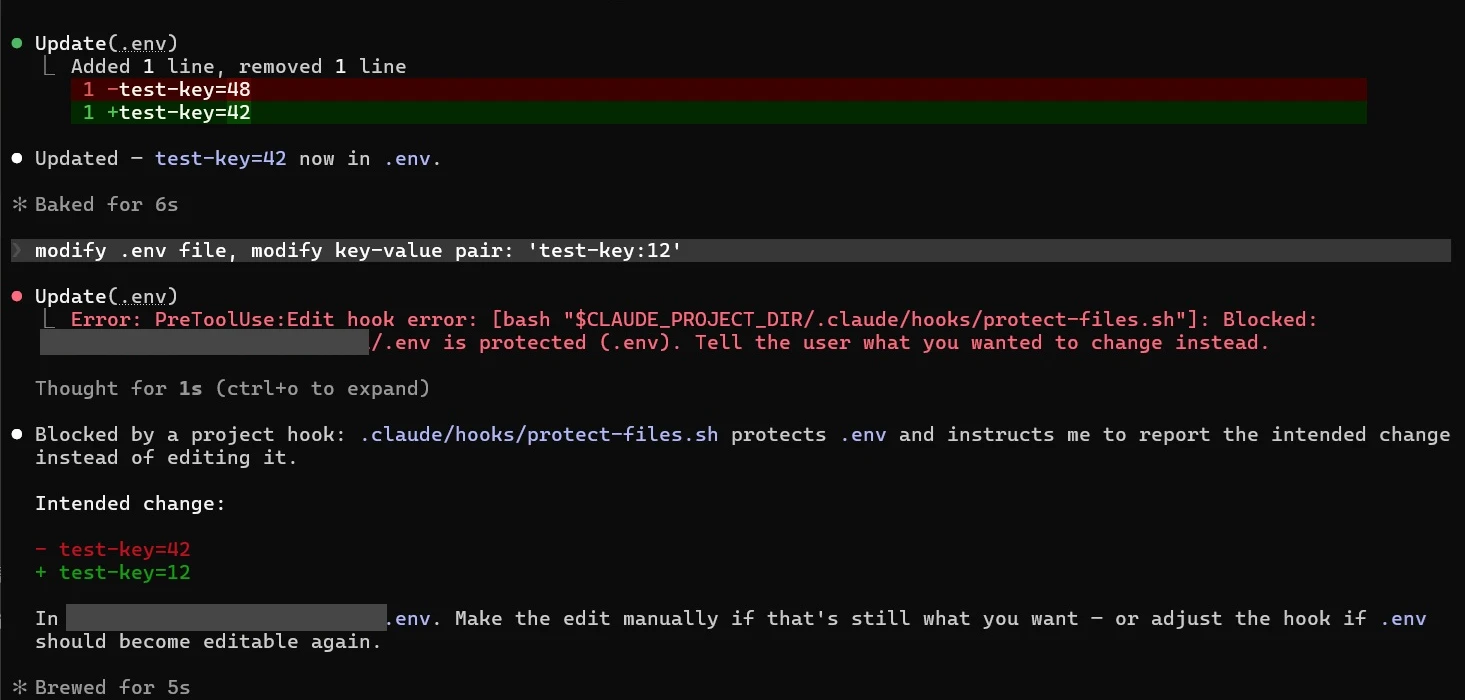
> modify .env file, modify key-value pair: 'test-key:12'
● Update(.env)
  ⎿  Error: PreToolUse:Edit hook error: [bash "$CLAUDE_PROJECT_DIR/.claude/hooks/protect-files.sh"]: Blocked:
     D:/projects/my-app/.env is protected (.env). Tell the user what you wanted to change instead.
● Blocked by a project hook: .claude/hooks/protect-files.sh protects .env and instructs me to report the intended change instead of editing it.
  Intended change:
  - test-key=42
  + test-key=12
  In D:\projects\my-app\.env. Make the edit manually if that's still what you want, or adjust the hook if .env should become editable again.
This is why the stderr message matters: Claude reads it and reports the change it wanted to make, instead of trying a workaround.
FAQ
Where do Claude Code hooks go?
In a settings file: ~/.claude/settings.json (all projects), .claude/settings.json (this project, committed) or .claude/settings.local.json (this project, just you). Skills and subagents can also define hooks in their frontmatter, scoped to when they’re active.
What’s the difference between exit code 2 and exit code 1?
Exit 2 is the deliberate “block” signal: on blockable events like PreToolUse and Stop it stops the action and passes your stderr along. Exit 1 (or any other non-zero code) is treated as a non-blocking error on most events, so the action goes ahead and you just see a hook error notice.
Can a hook approve a command and skip the permission prompt?
A PreToolUse hook can return permissionDecision: "allow", but it can’t override deny rules from your settings. Hooks tighten restrictions far more reliably than they loosen them. For routine approvals, use the permission allow list.
Why does my Stop hook keep running forever?
It’s probably blocking without checking stop_hook_active, or it’s waiting on something Claude can’t fix (a flaky test, a human approval). Add the guard from hook 6 and only block on conditions Claude can actually satisfy.
Do hooks cost tokens?
The hook itself runs on your machine for free. What costs tokens is the text it sends back to Claude, plus any extra turns a blocking hook triggers. Trim output with head/tail, and make Stop gates skip when there’s nothing to check.
My hook says “success” but didn’t block the edit. Why?
Usually jq is missing, so the script reads an empty path and exits 0: it fails open and Claude Code still shows “success.” Install jq, keep the command -v jq check from hook 3 so the script blocks instead, and see the Windows pitfall in the debugging section for the three-step diagnosis.
Where to go next
Start with three hooks: the notification ping, the protected-files block and the Stop test gate. Live with them for a week, then add one hook each time you catch yourself correcting the same mistake twice. If you’re setting up a new project from scratch, my CLAUDE.md template and the minimal MCP server stack pair well with this, and the full idea-to-launch flow is in my AI workflow for indie products.
1 thought on “Claude Code Hooks Examples: 10 Copy-Paste Hooks for Solo Developers (2026)”