Short answer: Claude Code for non-developers works best through the Claude desktop app, not the terminal. Pay for Claude Pro ($20/month; the free plan does not include Claude Code), open the Code tab, point it at an empty folder, and start in Plan mode. Build one small feature at a time, save a Git commit after each one that works, then deploy to Vercel’s free Hobby plan and add your domain. Most first-timers don’t get stuck on the code. They get stuck on deployment: environment variables, localhost links, and auth redirect settings. Plan for those on day 2.
Last updated: October 17, 2026. Grounded in Anthropic’s desktop quickstart and desktop docs, the Claude pricing page, and Vercel’s and Supabase’s pricing and docs, all checked on that date.
This is a plan, not a diary. I won’t pretend I watched you build your app. What I can give you is the order of operations that keeps showing up in the success stories (and the horror stories) from non-technical founders on r/ClaudeAI, r/vibecoding, Indie Hackers and Hacker News, checked against the official docs.
The pattern in those threads is consistent. People who ship pick a tiny scope, check every step, and treat Claude like a fast junior developer who sometimes says “fixed!” too early. People who stall build for 20 minutes, then spend three weeks trying to get the thing online. One Hacker News commenter summed up the classic failure perfectly: someone proudly shares the site they built, and the link is http://localhost:3000. That link only works on their own laptop.
The 8 words you’ll hear all weekend
You don’t need to learn to code. You do need these words, because Claude will use them and you’ll need to tell it what you want.
| Term | Plain English |
|---|---|
| Terminal | A text window where you type commands. The desktop app means you mostly don’t need it. |
| Repo (Git) | Your project folder plus a full history of saved versions. |
| Commit | One saved version, like a checkpoint in a game. Saved on your computer only. |
| Push | Uploading your commits to GitHub. “Committed” doesn’t mean “pushed.” |
| localhost | Your app running only on your own computer. Nobody else can open it. |
| Deploy | Putting your app on a server so anyone can open it at a real URL. |
| Environment variable | A setting (often a secret key) that lives outside your code, like SUPABASE_URL. |
| RLS | Row Level Security: database rules that decide who can read or change each row. |
Lovable, Cursor or Claude Code? Pick by how much you want to own
All three can get a non-developer to a working app. They suit different people.
| Tool | What it feels like | Best for | Watch out for |
|---|---|---|---|
| Lovable | Chat in a browser, app appears, hosting built in | You never want to see a file or install anything | Credits run out; when it breaks, you’re debugging code you’ve never seen |
| Cursor | A code editor with AI built in | You’re curious about the code and want to see every file | It’s an editor first, which can feel like a cockpit |
| Claude Code (desktop app) | Chat on the left, your real files, a preview browser and diffs on the right | You want to own the code, deploy anywhere, and grow past a prototype | Paid plan required; you manage GitHub, hosting and the database yourself |
Lovable’s free plan gives you 5 build credits a day (up to 30 a month), and you own the code it writes. That’s a great way to test whether your idea is even fun before you spend a weekend on it.
My honest take: if this is a throwaway demo, use Lovable. If you plan to charge money, add features for months, or hand the code to a developer later, use Claude Code. A good point from a recent Hacker News thread: no-code and vibe-code tools don’t make the code go away. They just move who has to maintain it. With Claude Code, the code sits in a normal folder on your computer and in your own GitHub account, so you’re never locked in. For prices and limits across Claude Code, Codex and Cursor, see Claude Code vs Codex vs Cursor.
Friday night: setup without terminal fear (about 1 hour)
1. Get a paid Claude plan. Claude Code needs Pro, Max, Team or Enterprise. Pro is $20/month billed monthly, or $17/month if you pay $200 for the year.
2. Install the Claude desktop app (macOS, Windows, or Linux beta), sign in, and click the Code tab at the top. The app includes Claude Code, so you don’t need to install Node.js or the command-line version just to talk to Claude.
3. Create an empty folder called something like my-first-app. In the Code tab, choose Local, then Select folder, and pick it.
4. Pick a permission mode with the selector next to the send button:
- Plan: Claude looks around and proposes a plan, but doesn’t edit your source code. Start here.
- Manual: Claude asks before every edit or command. Use this for your first hour so you see what it does.
- Accept edits: Claude applies file edits on its own but still asks before other commands. Switch to this once you trust the flow.
- Bypass permissions: skip it. Anthropic says to use it only in sandboxed containers or VMs.
5. Make three free accounts: GitHub (stores your code), Vercel (hosts your app), Supabase (database and logins, only if your app needs to save data).
6. Install Git if you don’t have it. Most Macs already include it. On Windows, Anthropic recommends Git for Windows. Accept the installer defaults. When Claude starts building, it will probably ask you to install Node.js for the app itself. That’s normal.
Prefer the terminal anyway? The official one-line install is curl -fsSL https://claude.ai/install.sh | bash on macOS/Linux, or irm https://claude.ai/install.ps1 | iex in Windows PowerShell. Then run claude --version to check it worked. You don’t need it for this weekend.
Your first message: set the working agreement
The most useful tip I found in a non-developer’s write-up wasn’t a clever prompt. It was a “working agreement” written into CLAUDE.md, the file Claude Code reads at the start of every session. Paste this as your first message:
I'm not a developer. Before we build anything, create a CLAUDE.md file
with these working rules, then show it to me:

- Explain every change in plain English, in 2-3 sentences, before you make it.
- Work in small steps. One feature at a time. Stop after each step so I can test it.
- After each step that works, make a git commit with a clear message.
- Never put secret keys in code. Secrets go in .env.local, which must be in .gitignore.
- If you're not sure something works, say so. Don't say "fixed" until you've
  checked it in the preview browser.
- Prefer boring, popular tools: Next.js, Tailwind, Supabase, Vercel.
You can refine it later with the CLAUDE.md template, but this is enough for a weekend.
Saturday: build the app with Plan mode
Step 1: write a one-page brief
Scope is where weekends die. A good first app has one main screen, one type of data, and zero payments. A waitlist page that saves emails, a booking-request form for your studio, or a shared reading list all fit. “Airbnb for dog walkers” doesn’t. Fill this in and paste it in Plan mode:
Here is my app brief. Read it, ask me up to 5 questions about anything unclear,
then propose a step-by-step plan. Don't write code yet.

App name: ...
Who it's for: ...
The one thing it does: ...
Main screen: what the user sees and clicks
Data it saves (if any): e.g. name, email, date
Who can see the data: e.g. only me (admin), never other visitors
Out of scope this weekend: payments, mobile app, teams, emails
Done means: a stranger can open the live URL on their phone and complete
the main action.
Step 2: read the plan like a manager
You can’t judge the code, but you can judge a plan. Before you approve, ask:
Before I approve: list every outside service this plan needs, every secret
key I'll have to create, and anything that will only work on my computer
until we deploy. Then split the plan into steps I can test one at a time.
That last question catches the localhost problem on Saturday instead of Sunday night. In the desktop docs, Anthropic’s own advice is to start complex work in Plan, then switch to Accept edits or Manual to execute.
Step 3: build in slices, check each one
A sensible order for most small apps:
- The screen, with fake data. No database yet. Just make it look and click right.
- Save the data. Connect Supabase, create the table, turn on RLS.
- Polish. Mobile layout, error messages, empty states.
After each slice, look at it in the desktop app’s Browser pane. Claude can start the dev server there, click around, take screenshots and fix what it finds. Then look yourself: click the +12 -1 style indicator to open the diff view and see which files changed. If a change touches a file you don’t understand, click the line and ask what it does. If the answer is vague, reject it.
When you have a “what does that even mean?” question mid-build, use a side chat (/btw or Cmd+; on Mac, Ctrl+; on Windows). It can read the whole conversation, but nothing you ask goes back into the main session, so your build stays on track.
Then commit:
That works. Commit this step with a clear message and tell me how to undo
it if I need to.
Step 4: the database without the scary parts
If your app saves anything, Supabase’s free plan is plenty for a first project: 500 MB database, 50,000 monthly active users, 2 active projects. One catch: free projects pause after a week of inactivity. One Indie Hackers founder had an App Store review fail partly because their free database had gone to sleep, so the app looked broken to the reviewer. Open your app every few days, or upgrade before real users arrive.
Prompt:
Connect this app to Supabase. Walk me through creating the project in the
dashboard step by step, tell me exactly which keys to copy and where to put
them, and keep the secret key out of any browser code. Turn on RLS for every
table and explain each policy in one sentence.
When Claude gets stuck in a loop
Every non-developer thread has this moment: Google login works, then the data stops loading, then the fix breaks login again. A founder on X joked that an agent announcing “this should work now” is describing a mood, not a guarantee. Here’s the protocol I’d follow:
- Stop after the second failed fix. Press Esc.
- Go back to your last good commit. Ask Claude to undo everything since it.
- Start a fresh session so the failed attempts don’t confuse it.
- Describe the symptom, not your theory. Paste the exact error message or a screenshot.
- Ask for evidence before changes:
Don't change anything yet. Add logging so we can see exactly where this
fails, then tell me what to click to reproduce it. Give me your top 2
explanations and how we'd tell them apart.
If one area keeps breaking, it’s usually too big. Ask Claude to split it into smaller pieces and test each piece on its own.
Sunday: deploy to Vercel and add your domain
Push to GitHub
Remember: commits live on your laptop until you push. A musician who learned Git this year made exactly this point on X: your agent says it committed, and GitHub is still empty. Ask:
Create a private GitHub repository for this project and push all commits.
Check that .env.local is NOT included. Then give me the GitHub URL.
Import into Vercel
In the Vercel dashboard, create a new project, import your GitHub repo, and accept the framework Vercel detects. Every push to your main branch now redeploys automatically.
Then add your environment variables in the project settings, and this is where most first deploys break:
- Copy every variable from
.env.localinto Vercel, ticking Production (and Preview if you use preview links). - Redeploy after changing them. Vercel’s docs are explicit: changes to environment variables only apply to new deployments, not existing ones.
- Variables starting with
NEXT_PUBLIC_(orVITE_in Vite apps) get baked into code that runs in the visitor’s browser. Never put a secret key behind those prefixes.
Kill the localhost ghosts
If login works on your laptop but fails on your friend’s phone, something still points at localhost. A r/vibecoding post showed exactly this: the live site was calling http://localhost:3001 for signup. Two fixes:
- In Supabase, open Auth URL Configuration and change the Site URL from
http://localhost:3000to your live URL. Supabase notes this matters for email confirmations and password resets. Add your Vercel URLs to the redirect allow list. - Ask Claude to search the code for hardcoded
localhostaddresses:
Search the whole project for "localhost" and any hardcoded URLs. Replace them
with environment variables, list what I need to add in Vercel, and tell me
what to change in Supabase URL Configuration for production.
Add a custom domain
In Vercel, open the project’s Settings → Domains → Add Domain. A root domain like example.com uses an A record; a subdomain like app.example.com uses a CNAME. Vercel shows the exact values to paste at your domain registrar. DNS changes can take a while to show up.
One warning from Vercel’s own docs: if you switch your domain’s nameservers to Vercel, copy your existing DNS records first, especially MX records. Otherwise your email stops arriving. If you only change the A or CNAME record, your other records stay as they are.
Final test: open the live URL on your phone, on mobile data, in a private window, and complete the main action. That’s your “done.”
Don’t skip: security basics
AI agents optimize for “it works.” “It’s safe” is your job. Before you share the link anywhere:
- Every Supabase table has RLS on, and a second test account can’t see your data.
- No secret keys in the browser, in GitHub, or behind
NEXT_PUBLIC_/VITE_. - Admin pages actually check who’s logged in, not just hide a button.
.env.localis in.gitignore, and GitHub shows no.envfiles.
Run /code-review in the desktop app before your launch commit, then paste this:
Do a read-only security pass before launch. Check RLS on every table, secrets
in code or git history, routes that trust user input, and admin pages anyone
could open. Rank findings by risk and explain each in plain English.
The full list, with test steps, is in the vibe-coded app security checklist.
What it costs
| Item | Weekend cost | When you’d pay more |
|---|---|---|
| Claude Pro | $20/month ($17/month billed annually) | Max starts at $100/month if you hit limits daily |
| Vercel Hobby | $0 | Pro is $20/month, and Hobby is for personal, non-commercial use |
| Supabase Free | $0 | Pro from $25/month: no pausing, daily backups |
| GitHub | $0 for private repos | Not needed for a solo first app |
| Domain | Yearly fee at your registrar | Depends on the extension |
Two things that surprise people. First, Vercel’s Hobby plan is for personal, non-commercial use. The moment you charge customers, budget for Pro. Second, Claude limits reset on a rolling five-hour window with weekly caps on top, and your chats and Claude Code share the same pool. A long Saturday can hit the limit. Check the usage ring next to the model picker. When context gets long, type /compact, or start a new session between features. More tactics are in how to reduce Claude Code token usage.
If you keep hitting limits and money is tight, some people point Claude Code at a cheaper model. DeepSeek is the one I’d look at: definitely not the smartest, but the cheapest I know of. Its deepseek-flash model lists $0.30 per million input tokens and $1.20 per million output tokens at peak, half that off-peak. It’s fine for small UI tweaks, but I wouldn’t let it design your auth. It takes some setup, so leave it until after your first launch. The how-to is in free Claude Code alternatives.
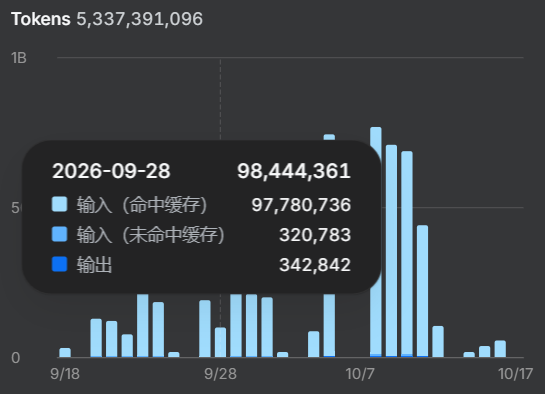
My real bill, for scale: over the last 30 days my DeepSeek API spend was about ¥266 (roughly $40 at about 6.69 yuan per US dollar) for about 5.3 billion tokens. Almost all of it was cache-hit input. On September 28, the day shown below, 99.3% of the tokens were input DeepSeek had already cached. A coding agent re-sends the same project context on every turn, and DeepSeek bills repeated, cached input at $0.003 per million tokens off-peak, 50 times less than fresh input. That is why so many tokens cost so little. It’s still the cheapest option, not the smartest. The other AI tools I use are flat monthly subscriptions, so this is the only line on my bill that moves with usage.
FAQ
Do I need to know how to code to use Claude Code?
No, but you need to be a careful manager. Write a clear brief, test every step yourself, read the plain-English explanation of each change, and say no to anything you don’t understand. Non-developers who ship tend to describe their role as reviewer and decision-maker, not author.
Can I use Claude Code for free?
Not on Anthropic’s own plans. Claude Code is included in Pro, Max, Team and Enterprise, but not the free claude.ai plan. If $20 is a hard no, the free Claude Code alternatives post covers open-source tools that bring your own model.
Lovable vs Claude Code: which is better for a first app?
Lovable is faster to start because everything lives in the browser, including hosting. Claude Code gives you more control: real files, your own GitHub repo, any host, and room to grow. If you’ll maintain the app for months, start with Claude Code, or prototype in Lovable and move the code later.
Can I do this on Windows?
Yes. The desktop app runs on Windows (x64, with a separate ARM64 installer), and Anthropic recommends installing Git for Windows. If Claude needs Linux tools, the desktop app can also run sessions in WSL 2.
What if my app breaks after launch?
Every push makes a new deployment, and Vercel can roll back to an earlier one. Fix forward in small steps: reproduce the bug, go back to the last good commit if needed, and use the loop protocol above. Keep your commits small so “undo” is always one step.
How do I stop Claude from changing things I didn’t ask for?
Be specific about scope (“only change the signup form”) and use Manual mode for risky areas. Read the diff before accepting. Put the rule in CLAUDE.md, too: “Only change files related to the current step.”
After the weekend
Use the app for a week before adding feature two. Next, it’s worth learning Claude Code skills (reusable prompts for things like release notes and launch posts) and a couple of MCP servers (connectors that let Claude talk to Supabase or GitHub directly). For the whole idea-to-launch workflow, see my AI workflow for indie products.
Pick something small, give it 48 hours, and make sure it works on someone else’s phone.
1 thought on “Claude Code for Non-Developers: Build and Ship Your First Web App in a Weekend”