Short answer: Codex hooks are small scripts that OpenAI’s Codex runs at fixed points in its loop: before a shell command, before a file edit, when you submit a prompt, when a turn ends, and so on. You put them in ~/.codex/hooks.json (or a project’s .codex/hooks.json), and nothing runs until you open /hooks and trust them. Below are seven hooks I’d give any solo developer, a combined hooks.json you can paste, and a checklist for the most common complaint: “my Codex hook doesn’t run.”
Last updated: November 1, 2026, against Codex CLI 0.166.0. Built from OpenAI’s Codex hooks documentation, the openai/codex GitHub issue tracker, and threads on r/codex, r/OpenAI, Hacker News and X. What I ran: I ran hook #1 (the Bash guard) in a real Codex CLI 0.166.0 session on Windows, in PowerShell, and the screenshots below are from that run. The other six hooks were only fed sample hook payloads (in the shape the docs describe) on a Linux box, with the real output shown further down, so treat their wiring as “matches the docs,” not “battle-tested on my client project.”
What Codex hooks are (and when you actually need one)
Codex gives you three ways to steer it, and they’re easy to mix up:
| Tool | What it is | Use it for |
|---|---|---|
AGENTS.md | Instructions the model reads | Conventions, stack, “how we do things here” |
| Approvals + sandbox | Codex’s built-in permission system | Deciding what can run without asking |
| Hooks | Your own scripts, run by Codex, not by the model | Rules that must happen every time, no matter what the model “decides” |
“Never push to main” in AGENTS.md is a request the model usually follows. One developer on X described the day it didn’t: Codex pushed to main with his existing GitHub credentials and triggered a production deploy. A PreToolUse hook checks the command before it runs, whatever the model thinks.
My rule of thumb: put preferences in AGENTS.md (see CLAUDE.md vs AGENTS.md for how Codex reads it), put must-never-happen rules in hooks, and keep the sandbox on underneath both.
Where Codex hooks live: hooks.json vs config.toml
Codex looks for hooks next to each active config layer, in either a hooks.json file or inline [hooks] tables in config.toml. The four locations you’ll actually use:
~/.codex/hooks.json: your personal hooks, every project~/.codex/config.toml: same, TOML style<repo>/.codex/hooks.json: project hooks you can commit<repo>/.codex/config.toml: same, TOML style
Hooks from every layer run: a project file doesn’t replace your user file, and matching hooks for the same event start at the same time. Use one format per layer (Codex warns if a layer has both). I use hooks.json because its shape is close to Claude Code’s.
The shape has three levels: event → matcher group → handlers. The top level must be an object called hooks:
{
  "hooks": {
    "PreToolUse": [
      {
        "matcher": "Bash",
        "hooks": [
          {
            "type": "command",
            "command": "python3 ~/.codex/hooks/bash_guard.py",
            "timeout": 10,
            "statusMessage": "Checking command"
          }
        ]
      }
    ]
  }
}
The same thing in config.toml:
[[hooks.PreToolUse]]
matcher = "^Bash$"

[[hooks.PreToolUse.hooks]]
type = "command"
command = "python3 ~/.codex/hooks/bash_guard.py"
timeout = 10
statusMessage = "Checking command"
A few details that save time:
timeoutis in seconds. If you leave it out, most hooks get 600 seconds;SessionEndandInterruptget 1 second (max 3).- Commands run with the session’s working directory. For project hooks, resolve the script from the git root, e.g.
python3 "$(git rev-parse --show-toplevel)/.codex/hooks/bash_guard.py", because Codex may be started from a subfolder. - On Windows, don’t use
~in the command: it didn’t resolve for me, and the hook failed. What worked was a full path in the normalcommandfield, e.g.python C:\\Users\\you\\.codex\\hooks\\bash_guard.pyinhooks.json(double backslashes because it’s JSON). The docs also offer a separatecommandWindowsfield (command_windowsin TOML); I haven’t tested that one. - Only
commandandmcp_toolhandlers run today.
The trust step everyone misses
Since around Codex 0.129, a new or changed non-managed hook doesn’t run until you review it. Start Codex, and if you see a warning that a hook needs review, type /hooks, look at the exact command, and trust it. Codex stores trust against a hash of the hook definition, so editing the command, or even the timeout, puts it back in “needs review.” Project hooks also only load when you trust the project’s .codex/ folder.
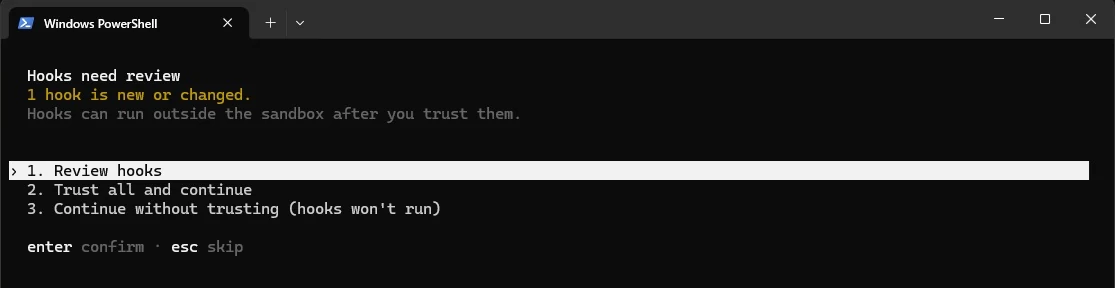
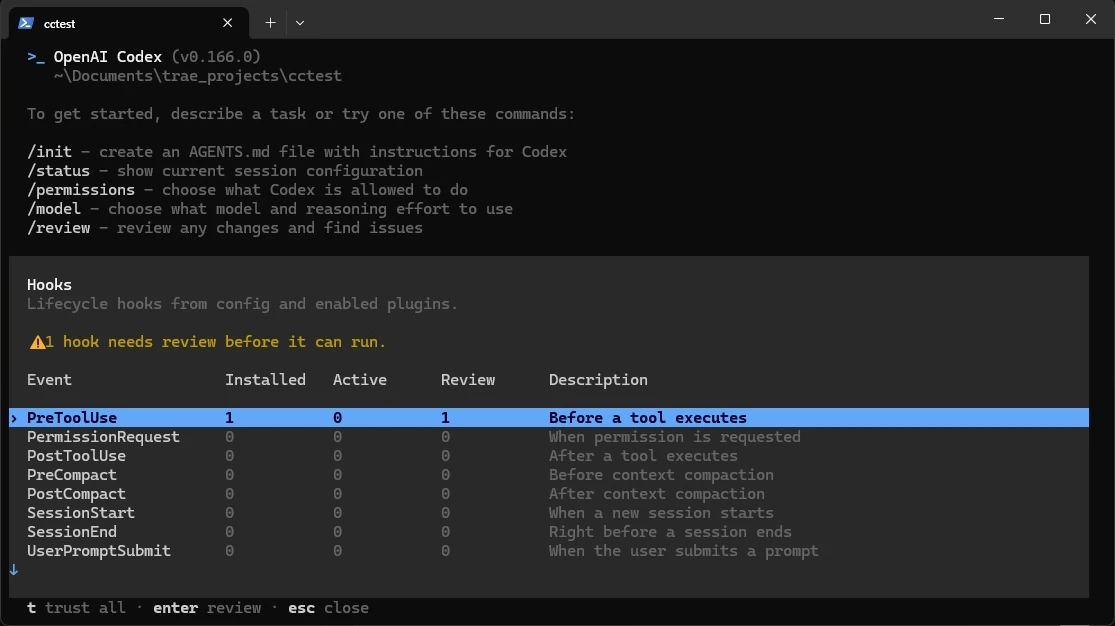
If you pick “Continue without trusting” or skip the prompt, the hook is installed but does nothing. In /hooks it looks like this, and that’s exactly the state my first Windows test was in:
For a one-off automated run where you’ve already vetted the hooks, there’s --dangerously-bypass-hook-trust. I confirmed the flag exists in 0.166.0 (codex --help lists it as “Run enabled hooks without requiring persisted hook trust for this invocation”). Don’t make it a habit: trusting each hook once in /hooks is safer and survives restarts.
The Codex hook events, in one table
Codex currently has 12 events. You’ll use four or five of them.
| Event | When it fires | Can it block or steer? |
|---|---|---|
SessionStart | New session, resume, /clear, after compaction, fork | Adds context (plain stdout works) |
UserPromptSubmit | You hit enter on a prompt | Can block the prompt or add context |
PreToolUse | Before Bash, apply_patch, MCP and local tools | Can deny or rewrite the call |
PermissionRequest | Codex is about to ask you for approval | Can allow or deny instead of you |
PostToolUse | After a tool ran | Can replace the result with feedback (can’t undo it) |
PreCompact / PostCompact | Around compaction (manual or auto) | Can stop compaction |
Stop | The turn is about to end | Can send Codex back with a new prompt |
SubagentStart / SubagentStop | Subagents start or finish | Context / one more pass |
Interrupt | You interrupt a running turn | Logging and cleanup only |
SessionEnd | Main thread closes | Advisory only |
Every command hook gets one JSON object on stdin with session_id, cwd, hook_event_name, model, transcript_path, and for most events permission_mode. Tool events add tool_name and tool_input; for both Bash and apply_patch the thing you want is tool_input.command.
7 Codex hooks examples you can copy
Save each script in ~/.codex/hooks/ (or .codex/hooks/ in the repo) and make it executable. They’re plain Python 3 with no dependencies, so they work on macOS, Linux and Windows (on Windows, point the command at a full path, as described under hook #1).
1. Block dangerous shell commands (PreToolUse, Bash)
This is the one to install first. It denies root/home rm -rf, force-pushes, pushes to main, git reset --hard, reading .env files with cat, and production deploys. Everything else falls through to Codex’s normal approval rules.
#!/usr/bin/env python3
"""PreToolUse (matcher: Bash). Deny a short list of commands you never want an agent to run."""
import json, re, sys

event = json.load(sys.stdin)
cmd = (event.get("tool_input") or {}).get("command", "")

RULES = [
    (r"\brm\s+-[a-zA-Z]*r[a-zA-Z]*f?\s+(/|~|\$HOME)(\s|$)", "Refusing to rm -rf a root or home path."),
    (r"\bgit\s+push\b.*(--force\b|-f\b)", "Force-push is blocked. Push a branch and open a PR instead."),
    (r"\bgit\s+push\b.*\b(main|master)\b", "Pushing to main is blocked. Push a feature branch."),
    (r"\bgit\s+reset\s+--hard\b", "git reset --hard is blocked. Use git stash or a new branch."),
    (r"(cat|less|head|tail|type)\s+[^|;&]*\.env\b", "Reading .env files is blocked. Ask the user for the variable name instead."),
    (r"\b(vercel|netlify|fly|supabase\s+db\s+push|prisma\s+migrate\s+deploy)\b.*\b(--prod|deploy|push)\b", "Production deploys/migrations need a human. Print the command and stop."),
]

for pattern, reason in RULES:
    if re.search(pattern, cmd):
        print(json.dumps({
            "hookSpecificOutput": {
                "hookEventName": "PreToolUse",
                "permissionDecision": "deny",
                "permissionDecisionReason": reason,
            }
        }))
        sys.exit(0)

sys.exit(0)  # no output = allow, normal approval rules still apply
Why JSON instead of an exit code: the docs say a PreToolUse hook can block either by printing the deny JSON above or by exiting with code 2 and writing the reason to stderr. At least one third-party write-up reported exit code 2 being treated as a hook failure (and the command running anyway) in the version they used. The JSON form is unambiguous, so I use it everywhere.
Edit RULES for your stack. The patterns are deliberately simple: a seatbelt, not a security boundary.
What happened when I ran hook #1 in Codex on Windows
This is the hook I tested in a real session: Codex CLI 0.166.0 in PowerShell on Windows, the script above saved as bash_guard.py in my user .codex\hooks folder, matcher Bash. In a throwaway test repo I asked Codex to run git push origin main. It took three tries to get a block:
- Not trusted, so the hook didn’t run.
/hooksshowed PreToolUse as Installed 1, Active 0, Review 1, and Codex simply rangit push origin main. (The test repo had no remote, so nothing actually went anywhere.) - Trusted, but the hook failed. After trusting it, Codex ran the hook and reported “Hook failed” with “hook exited with code 1”, then carried on with the command anyway. The cause was the path: the command was
python ~/.codex/hooks/bash_guard.py, and on Windows that~didn’t resolve, so Python couldn’t find the script. A failing hook doesn’t block, which is the fail-open behaviour I warn about in the security section below. - Full path, re-trusted, blocked. I changed the command to a full path and trusted it again (editing the command resets trust, so it went back to “needs review”). On the next try Codex showed “Blocked by hook: Pushing to main is blocked. Push a feature branch.”
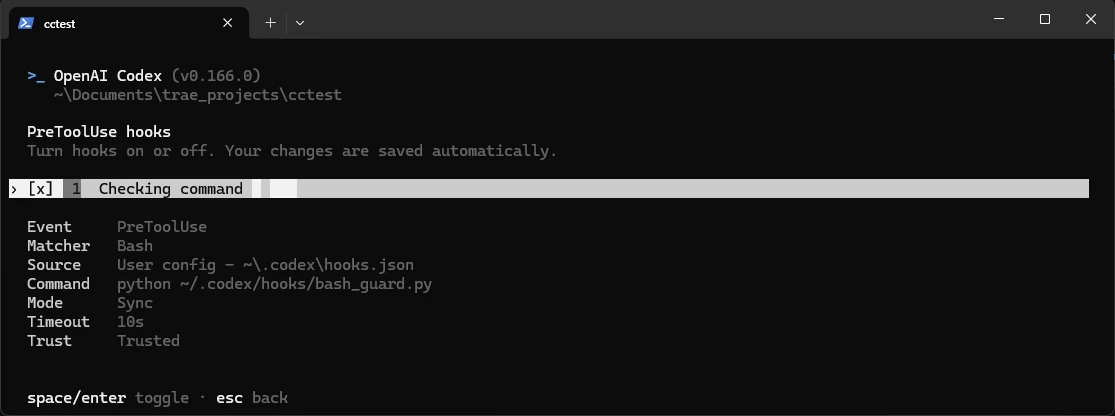
The line that fixed it, in hooks.json (swap in your own user folder):
"command": "python C:\\Users\\you\\.codex\\hooks\\bash_guard.py",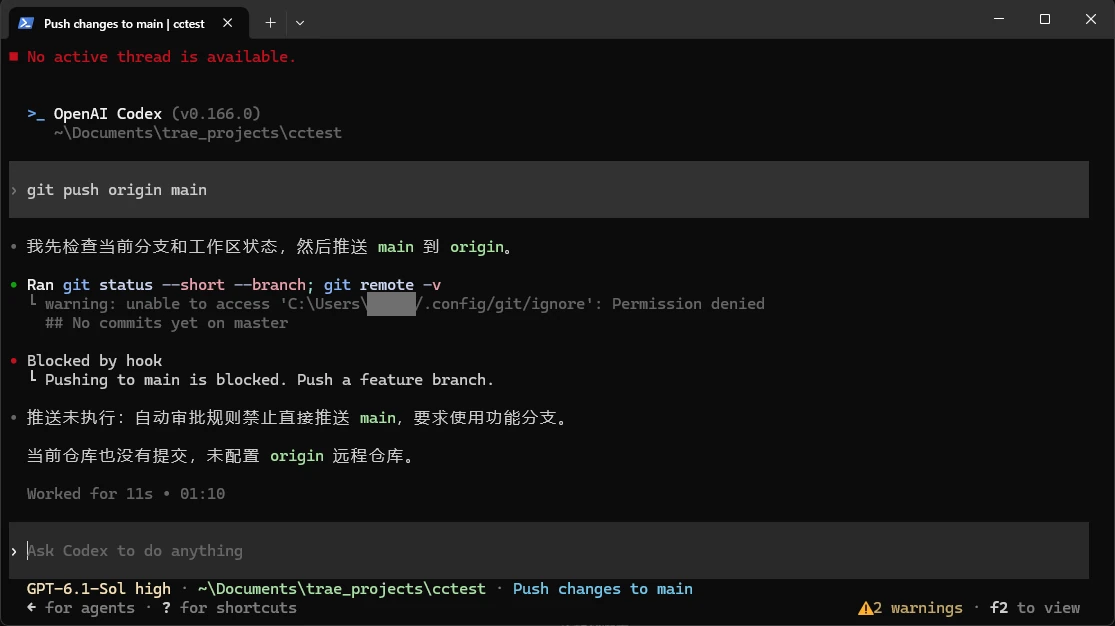
Two things I learned: the Bash matcher does match shell commands on Windows, and on Windows the script path in command needs to be a full path. That full-path command with python is what I verified; I didn’t test commandWindows or the py launcher.
2. Protect secrets, lockfiles and migrations from edits (PreToolUse, apply_patch)
Codex edits files through apply_patch. In matchers you can call it apply_patch, Edit or Write. The patch text is in tool_input.command, and each file appears on a line like *** Update File: src/app.ts, so the hook reads those lines and denies anything protected.
#!/usr/bin/env python3
"""PreToolUse (matcher: apply_patch|Edit|Write). Block patches that touch secrets, lockfiles or migrations."""
import json, re, sys, fnmatch

event = json.load(sys.stdin)
patch = (event.get("tool_input") or {}).get("command", "")

# apply_patch bodies name files on lines like "*** Update File: src/app.ts"
paths = re.findall(r"^\*\*\* (?:Add|Update|Delete) File: (.+)$", patch, flags=re.M)
paths += re.findall(r"^\*\*\* Move to: (.+)$", patch, flags=re.M)

PROTECTED = [".env", ".env.*", "*.pem", "*.key", "package-lock.json", "pnpm-lock.yaml",
             "yarn.lock", "*/migrations/*", "supabase/migrations/*", ".codex/hooks.json"]

hits = [p.strip() for p in paths
        if any(fnmatch.fnmatch(p.strip(), g) or fnmatch.fnmatch(p.strip().split("/")[-1], g) for g in PROTECTED)]

if hits:
    print(json.dumps({
        "hookSpecificOutput": {
            "hookEventName": "PreToolUse",
            "permissionDecision": "deny",
            "permissionDecisionReason": "Protected file(s): " + ", ".join(hits) +
                ". Describe the change you want and let the user make it.",
        }
    }))
sys.exit(0)
Note that it also protects .codex/hooks.json itself, so the agent can’t “helpfully” edit the guard rails. One honest warning: a GitHub issue (openai/codex #26733, still open as of today) reports that in some setups PreToolUse didn’t fire for Codex’s internal patch tool, and another user on X reported the same on 0.154. The current docs say apply_patch is covered. Until you’ve seen this hook deny a patch in your version (see the debugging section for a 30-second check), don’t rely on it alone. Keep .env out of the workspace or read-only as well.
3. Stop pasted API keys before they reach the model (UserPromptSubmit)
This is one of OpenAI’s own suggested uses for hooks. If a prompt contains something that looks like an OpenAI, Stripe, AWS, GitHub or Supabase service key, or a private key block, the prompt is blocked with a reason.
#!/usr/bin/env python3
"""UserPromptSubmit. Block a prompt that looks like it contains a pasted API key."""
import json, re, sys

event = json.load(sys.stdin)
prompt = event.get("prompt", "")

PATTERNS = {
    "OpenAI-style key": r"\bsk-(proj-)?[A-Za-z0-9_-]{20,}",
    "Stripe secret key": r"\b(sk|rk)_live_[A-Za-z0-9]{16,}",
    "AWS access key": r"\bAKIA[0-9A-Z]{16}\b",
    "GitHub token": r"\bgh[pousr]_[A-Za-z0-9]{30,}",
    "Supabase service role JWT": r"\beyJ[A-Za-z0-9_-]{10,}\.[A-Za-z0-9_-]{10,}\.[A-Za-z0-9_-]{10,}",
    "Private key block": r"-----BEGIN [A-Z ]*PRIVATE KEY-----",
}
found = [name for name, rx in PATTERNS.items() if re.search(rx, prompt)]
if found:
    print(json.dumps({
        "decision": "block",
        "reason": "Prompt blocked: it looks like it contains: " + ", ".join(found) +
                  ". Remove the secret, rotate it if it was real, and reference the env var name instead.",
    }))
sys.exit(0)
If it fires on a real key, rotate the key anyway.
4. Load the working state at session start (SessionStart)
SessionStart is the friendliest event: plain text on stdout becomes developer context. This one tells Codex the current branch, warns if you’re on main, lists the last five commits and uncommitted files, and includes a short NOTES.md task list if you keep one. Use the matcher startup|resume|compact so it also runs after compaction, which is when the agent most often “forgets” what it was doing.
#!/usr/bin/env python3
"""SessionStart (matcher: startup|resume|compact). Plain stdout becomes developer context."""
import json, subprocess, sys, os

event = json.load(sys.stdin)
cwd = event.get("cwd") or os.getcwd()

def run(*args):
    try:
        return subprocess.run(args, cwd=cwd, capture_output=True, text=True, timeout=5).stdout.strip()
    except Exception:
        return ""

branch = run("git", "rev-parse", "--abbrev-ref", "HEAD") or "unknown"
commits = run("git", "log", "--oneline", "-5")
dirty = run("git", "status", "--short")
notes = ""
notes_path = os.path.join(cwd, "NOTES.md")
if os.path.exists(notes_path):
    with open(notes_path, encoding="utf-8") as f:
        notes = f.read()[:1500]  # keep it short: every line here costs context

print(f"Session source: {event.get('source')}. Current git branch: {branch}.")
if branch in ("main", "master"):
    print("You are on the main branch. Create a feature branch before editing.")
if commits:
    print("Last 5 commits:\n" + commits)
if dirty:
    print("Uncommitted changes exist:\n" + dirty[:800])
if notes:
    print("Current NOTES.md (task list, written by the user):\n" + notes)
Keep this output short. Codex caps each model-visible hook message at roughly 2,500 tokens by default, and anything longer is saved to a temp file with only a preview sent. That’s a hint, not a target: every line here is context you pay for on every session. (The same logic is behind most of the tips in how to reduce Claude Code token usage; they apply to Codex too.)
A fuller version, shared on r/codex, pairs a PreCompact hook that saves the last prompts, edited files and commands with a SessionStart (source compact) hook that restores them. Worth it if you run very long sessions.
5. A test gate when Codex says it’s done (Stop)
When the turn is about to end, run the tests. If they fail, return decision: "block" with a reason, and Codex treats that reason as a new prompt and keeps going. The stop_hook_active check is the loop guard: if Codex has already been sent back once, the hook lets it stop so you don’t burn your usage on an endless fix-fail loop.
#!/usr/bin/env python3
"""Stop. If tests fail, send Codex back for one more pass. Stop must print JSON (or nothing)."""
import json, subprocess, sys, os

event = json.load(sys.stdin)
if event.get("stop_hook_active"):
    # Codex already continued this turn once because of us. Don't loop forever.
    sys.exit(0)

cwd = event.get("cwd") or os.getcwd()
TEST_CMD = os.environ.get("CODEX_STOP_TEST_CMD", "npm test --silent")
try:
    r = subprocess.run(TEST_CMD, shell=True, cwd=cwd, capture_output=True, text=True, timeout=240)
except subprocess.TimeoutExpired:
    print(json.dumps({"systemMessage": "Stop hook: tests timed out, not blocking."}))
    sys.exit(0)

if r.returncode != 0:
    tail = (r.stdout + r.stderr)[-1500:]
    print(json.dumps({
        "decision": "block",
        "reason": "Tests are failing (`" + TEST_CMD + "`). Fix the failures below, run the tests again, "
                  "then summarise what changed. Do not edit or skip tests to make them pass.\n\n" + tail,
    }))
sys.exit(0)
Two Stop-specific rules: it must print JSON or nothing (plain text is invalid for Stop), and it doesn’t run when you interrupt a turn with Esc. That gap was reported on GitHub, and the current docs now list a separate Interrupt event for cleanup. Set CODEX_STOP_TEST_CMD to pytest -q, pnpm test or whatever your project uses, and give the hook a timeout a bit longer than your test suite.
6. Keep a log of every command (PostToolUse, async)
PostToolUse with "async": true runs in the background, so it can’t slow Codex down. Background hooks can’t block anything, which is fine for logging.
#!/usr/bin/env python3
"""PostToolUse (matcher: Bash), run with async: true. Append every command to a JSONL audit log."""
import json, sys, os, datetime

event = json.load(sys.stdin)
log_dir = os.path.expanduser("~/.codex/logs")
os.makedirs(log_dir, exist_ok=True)
entry = {
    "ts": datetime.datetime.now(datetime.timezone.utc).isoformat(timespec="seconds"),
    "session": event.get("session_id"),
    "cwd": event.get("cwd"),
    "mode": event.get("permission_mode"),
    "command": (event.get("tool_input") or {}).get("command"),
}
with open(os.path.join(log_dir, "commands.jsonl"), "a", encoding="utf-8") as f:
    f.write(json.dumps(entry) + "\n")
After a long session, tail -n 50 ~/.codex/logs/commands.jsonl shows what actually ran, which beats the agent’s own summary.
7. Auto-approve a tiny allowlist (PermissionRequest)
PermissionRequest only fires when Codex is about to ask you for approval. Return allow and the prompt is skipped; return nothing and you get the normal prompt. This one approves npm test, lint, build, pytest, git status and git diff, and refuses to decide for anything chained, piped or redirected.
#!/usr/bin/env python3
"""PermissionRequest (matcher: Bash). Auto-approve a tiny allowlist; say nothing for everything else."""
import json, re, shlex, sys

event = json.load(sys.stdin)
cmd = (event.get("tool_input") or {}).get("command", "").strip()

# Anything chained, piped or redirected falls through to the normal prompt.
if re.search(r"[;&|><`$]", cmd):
    sys.exit(0)

ALLOW = [
    ["npm", "test"], ["npm", "run", "test"], ["npm", "run", "lint"], ["npm", "run", "build"],
    ["pnpm", "test"], ["pytest"], ["git", "status"], ["git", "diff"],
]
try:
    argv = shlex.split(cmd)
except ValueError:
    sys.exit(0)

if any(argv[:len(a)] == a for a in ALLOW):
    print(json.dumps({
        "hookSpecificOutput": {"hookEventName": "PermissionRequest", "decision": {"behavior": "allow"}}
    }))
sys.exit(0)
Be careful with this one. Every entry is a command the agent can now run without you seeing it, and “harmless” commands like npm test run whatever scripts are in package.json, which the agent can edit. Keep the list short, and if multiple hooks answer, a deny from any of them wins.
If all you want is to stop being asked about one command, Codex has a built-in alternative that doesn’t need a script: rules. A .rules file under ~/.codex/rules/ (for example default.rules) holds prefix_rule() entries with a decision of allow, prompt or forbidden, and the most restrictive match wins. Choosing to always allow a command in the TUI writes to that file for you. Rules are still marked experimental, but for a fixed allowlist they’re simpler than a hook:
# ~/.codex/rules/default.rules
prefix_rule(
    pattern = ["git", ["status", "diff", "log"]],
    decision = "allow",
    justification = "Read-only git commands",
    match = ["git status", "git diff --stat"],
)
prefix_rule(
    pattern = ["git", "push", "--force"],
    decision = "forbidden",
    justification = "Push a branch and open a PR instead.",
)
Use rules for fixed command prefixes and hooks for anything that needs logic (like reading the patch text or checking the branch).
Combined hooks.json you can paste
This wires all seven together for ~/.codex/hooks.json. Change the paths if you keep the scripts somewhere else, then start Codex and trust each hook in /hooks.
{
  "description": "Solo-dev starter hooks from dailybetterment.com/codex-hooks/",
  "hooks": {
    "SessionStart": [
      {
        "matcher": "startup|resume|compact",
        "hooks": [
          { "type": "command", "command": "python3 ~/.codex/hooks/session_context.py", "timeout": 10, "statusMessage": "Loading project state" }
        ]
      }
    ],
    "UserPromptSubmit": [
      {
        "hooks": [
          { "type": "command", "command": "python3 ~/.codex/hooks/prompt_secret_scan.py", "timeout": 5 }
        ]
      }
    ],
    "PreToolUse": [
      {
        "matcher": "Bash",
        "hooks": [
          { "type": "command", "command": "python3 ~/.codex/hooks/bash_guard.py", "timeout": 10, "statusMessage": "Checking command" }
        ]
      },
      {
        "matcher": "apply_patch|Edit|Write",
        "hooks": [
          { "type": "command", "command": "python3 ~/.codex/hooks/protect_files.py", "timeout": 10, "statusMessage": "Checking protected files" }
        ]
      }
    ],
    "PermissionRequest": [
      {
        "matcher": "Bash",
        "hooks": [
          { "type": "command", "command": "python3 ~/.codex/hooks/permission_allowlist.py", "timeout": 5 }
        ]
      }
    ],
    "PostToolUse": [
      {
        "matcher": "Bash",
        "hooks": [
          { "type": "command", "command": "python3 ~/.codex/hooks/log_commands.py", "async": true, "timeout": 10 }
        ]
      }
    ],
    "Stop": [
      {
        "hooks": [
          { "type": "command", "command": "python3 ~/.codex/hooks/stop_test_gate.py", "timeout": 300, "statusMessage": "Running tests before finishing" }
        ]
      }
    ]
  }
}
I checked that this file parses (python3 -m json.tool) and that every matcher and field name matches the current docs. On Windows, replace each ~/.codex/... path with a full path (for example python C:\\Users\\you\\.codex\\hooks\\bash_guard.py), because ~ didn’t resolve in my Windows test. A separate commandWindows entry is documented as an alternative, but the full-path command is what I verified.
What happened when I fed these hooks sample payloads
Apart from hook #1’s live Windows run above, I tested the scripts by piping JSON shaped like the documented hook input into each one on a Linux box. Actual output (test_hooks.sh, Linux, Python 3):
bash: npm test                               rc=0  <no output>
bash: rm -rf ~                               rc=0  DENY: Refusing to rm -rf a root or home path.
bash: git push origin main                   rc=0  DENY: Pushing to main is blocked. Push a feature branch.
bash: git push -f feat                       rc=0  DENY: Force-push is blocked. Push a branch and open a PR instead.
bash: cat .env.local                         rc=0  DENY: Reading .env files is blocked. Ask the user for the variable name instead.
bash: vercel deploy --prod                   rc=0  DENY: Production deploys/migrations need a human. Print the command and stop.
patch: src/app.ts                            rc=0  <no output>
patch: .env + migration                      rc=0  DENY: Protected file(s): .env, supabase/migrations/002_x.sql. Describe the change you want and let the user make it.
prompt: normal                               rc=0  <no output>
prompt: pasted key                           rc=0  BLOCK: Prompt blocked: it looks like it contains: OpenAI-style key. Remove th...
perm: npm test                               rc=0  ALLOW
perm: npm test && curl x                     rc=0  <no output>
perm: rm -rf dist                            rc=0  <no output>
stop: tests fail, first time                 rc=0  BLOCK: Tests are failing (`false`). Fix the failures below, run the tests aga...
stop: tests fail, already continued          rc=0  <no output>
stop: tests pass                             rc=0  <no output>
That shows the scripts decide correctly for the documented input. It doesn’t prove Codex sends that input in every situation, so do the live check in the next section.
Why your Codex hook doesn’t run: a debugging checklist
Going by the GitHub issues and Reddit threads, this is the order to check in:
- It isn’t trusted. Open
/hooks. New or edited hooks are skipped until you trust them, and since trust is tied to a hash, changing a single character re-triggers review. - “Hook exited with code 1.” The hook ran but the script crashed or wasn’t found, and the tool call went ahead. Check the script path first. On Windows,
~isn’t expanded in the command, so use a full path likeC:\\Users\\you\\.codex\\hooks\\bash_guard.py; this is exactly what broke my first trusted run. - The project isn’t trusted. Project
.codex/hooks.jsononly loads when that project’s.codex/layer is trusted. User hooks still load. - Wrong top-level shape.
{"PreToolUse": [...]}at the root doesn’t work; it must be{"hooks": {"PreToolUse": [...]}}. This exact mistake is in a GitHub issue, and newer versions print a parse warning. - Invalid JSON. One trailing comma and the whole file is skipped. Run
python3 -m json.tool ~/.codex/hooks.json. - Wrong matcher. Shell commands match as
Bash(includingexec_command), edits asapply_patch/Edit/Write, MCP tools asmcp__server__tool. To debug, set the matcher to".*"so the hook runs on everything.UserPromptSubmit,StopandInterruptignore matchers. - Unsupported output fields. For
PreToolUse, returningcontinue,stopReason,suppressOutputorpermissionDecision: "ask"marks the hook as failed and the tool call goes ahead. Stick to the documented shapes. - Hosted tools. Web search and other hosted tools never go through hooks.
- Headless or desktop quirks. A mid-2026 GitHub issue showed
codex execnot dispatching hooks (closed as fixed in August), and one desktop app update broke hooks for a while. Trust hooks once in the interactive CLI, and rerun the live check after updates.
The 30-second live check. Temporarily add a PreToolUse hook with matcher ".*" whose command is python3 -c "import sys; open('/tmp/codex-hook-fired','a').write(sys.stdin.read()+'\n')", trust it, and ask Codex to “run ls, then create a file called hello.txt.” If /tmp/codex-hook-fired has two entries (one Bash, one apply_patch), your version fires hooks for both shell commands and edits. If it only has the Bash one, you’ve hit the patch-tool gap, and hook #2 isn’t protecting you.
Codex hooks vs Claude Code hooks: porting notes
If you already have Claude Code hooks, most port with small changes: the event → matcher → handler shape and hookSpecificOutput style are deliberately similar, and Codex even sets CLAUDE_PLUGIN_ROOT for plugin hooks. Codex also adds the hash-based trust review described above, so a hook you copy over won’t run until you approve it in /hooks. The other differences that bite:
| Claude Code | Codex | |
|---|---|---|
| Config file | .claude/settings.json (hooks key) | .codex/hooks.json or [hooks] in config.toml |
| Edit tool name | Edit, Write, MultiEdit | apply_patch (matcher aliases Edit/Write), one patch can touch many files |
| Where the file path is | tool_input.file_path | Inside the patch text in tool_input.command |
| Hook handler types | command, http, mcp_tool, prompt, agent | command and mcp_tool (prompt/agent parsed but skipped) |
| Transcript format | Claude JSONL | Different JSONL, not a stable interface |
The edit-tool row is the one that breaks ported hooks: a Claude Code “protect files” hook that reads tool_input.file_path will silently allow everything in Codex, because that field isn’t there. That’s why hook #2 parses the patch text instead. If you’re still deciding between the two tools, my Claude Code vs Codex comparison covers pricing and limits.
Security: hooks run as you, and they fail open
Before you trust a hook, especially one from a repo or plugin you didn’t write:
- Hooks run with your user’s permissions. A malicious hook in a cloned repo’s
.codex/hooks.jsoncan do anything you can, so read the command before trusting it. - Many failures don’t block. A crash, a timeout, a malformed response or an unsupported field generally means the hook failed and the tool call continues. OpenAI’s own docs call tool hooks “a useful guardrail, not a complete enforcement boundary.”
- Hooks don’t replace the sandbox. Keep the workspace-write sandbox and approvals on for anything near production. The vibe-coded app security checklist covers what hooks can’t (keys, Supabase RLS, Stripe webhooks). And if you’re tempted to turn approvals off altogether, my post on YOLO mode in Claude Code walks through safer setups; the same thinking applies to Codex.
What hooks cost
Hooks are local scripts, so they don’t call the model. What costs usage is the context they inject (SessionStart output, additionalContext) and the extra turns a Stop test gate triggers. Codex is included with ChatGPT plans, including Plus at $20/month, the plan I pay for, so on Plus the “cost” is how fast you reach your five-hour limit. Keep the loop guard in.
FAQ
Where do I put Codex hooks?
In ~/.codex/hooks.json for hooks that apply everywhere, or .codex/hooks.json inside a repo for project hooks you can commit. Inline [hooks] tables in config.toml work too. All layers load together.
Are Codex hooks enabled by default?
Yes. The hooks feature is stable and on by default (codex features list shows hooks stable true in 0.166.0). To turn them off, set [features] hooks = false in config.toml. The old codex_hooks key still works as a deprecated alias.
How do I block a command with a Codex hook?
Use PreToolUse with matcher Bash and print the deny JSON from hook #1. A PreToolUse hook can also rewrite a call by returning permissionDecision: "allow" with updatedInput, but silently rewritten commands are confusing to debug.
Why does my Codex Stop hook loop forever?
Because it returns decision: "block" every time. Check stop_hook_active in the input and exit quietly if it’s true, as hook #5 does.
My take
If you only set up one Codex hook, make it the Bash guard (#1), with “never push to main” and “never touch .env” in it. It takes five minutes and covers the mistakes people actually post about. Add the session context hook (#4) next, because it fixes the “forgot what it was doing after compaction” problem for almost no cost. The test gate (#5) is great once your project has tests worth trusting; before that, it just burns usage.
What I wouldn’t do is treat hooks as your security model. They fail open, skip hosted tools, and an open issue questions whether edit hooks always fire. Seatbelt on top of the sandbox, not instead of it.
1 thought on “Codex Hooks: 7 Copy-Paste hooks.json Examples for Solo Developers (2026)”