Short answer: most Claude Code “limit” pain is long context, not one bad prompt. Run /clear between unrelated tasks (it costs nothing), measure with /usage and /context, keep CLAUDE.md under ~200 lines, and disable MCP servers you are not using this hour. Then match the model to the job so routine edits do not run on Opus.
Last updated: October 14, 2026. Tactics checked against Claude Code’s Manage costs and Best practices docs.
Context window vs plan quota (do not mix them up)
Claude Code has two different ceilings:
| Limit | What it is | What “full” looks like | How you recover |
|---|---|---|---|
| Context window | How much this conversation can hold | Quality drops; auto-compact fires | /compact mid-task, or /clear for a fresh chat |
| Plan usage quota | How much your Pro/Max/Team seat can burn | “You’ve hit your session/weekly limit” | Wait for the rolling window, switch lighter models when the message allows it, or turn on usage credits |
/clear empties the chat. It does not refill your weekly quota. Quota only recovers when the window resets (or when you pay for usage credits past the seat allowance).
If you want one habit: treat context as something you manage every hour, and quota as something you manage every day.
Measure first: /usage and /context
Before you change settings, look at the numbers.
- Run
/usage. On subscription plans you get plan usage bars plus a breakdown. Pressdorwfor the last 24 hours vs 7 days. Watch for flags when long context or cache misses account for 10%+ of recent usage. - Run
/context. See which Memory files, MCP tools, skills, and conversation chunks are eating space. - Optionally run
/insightsfor a local HTML report on friction patterns (it uses tokens too, so do it once, not every hour).
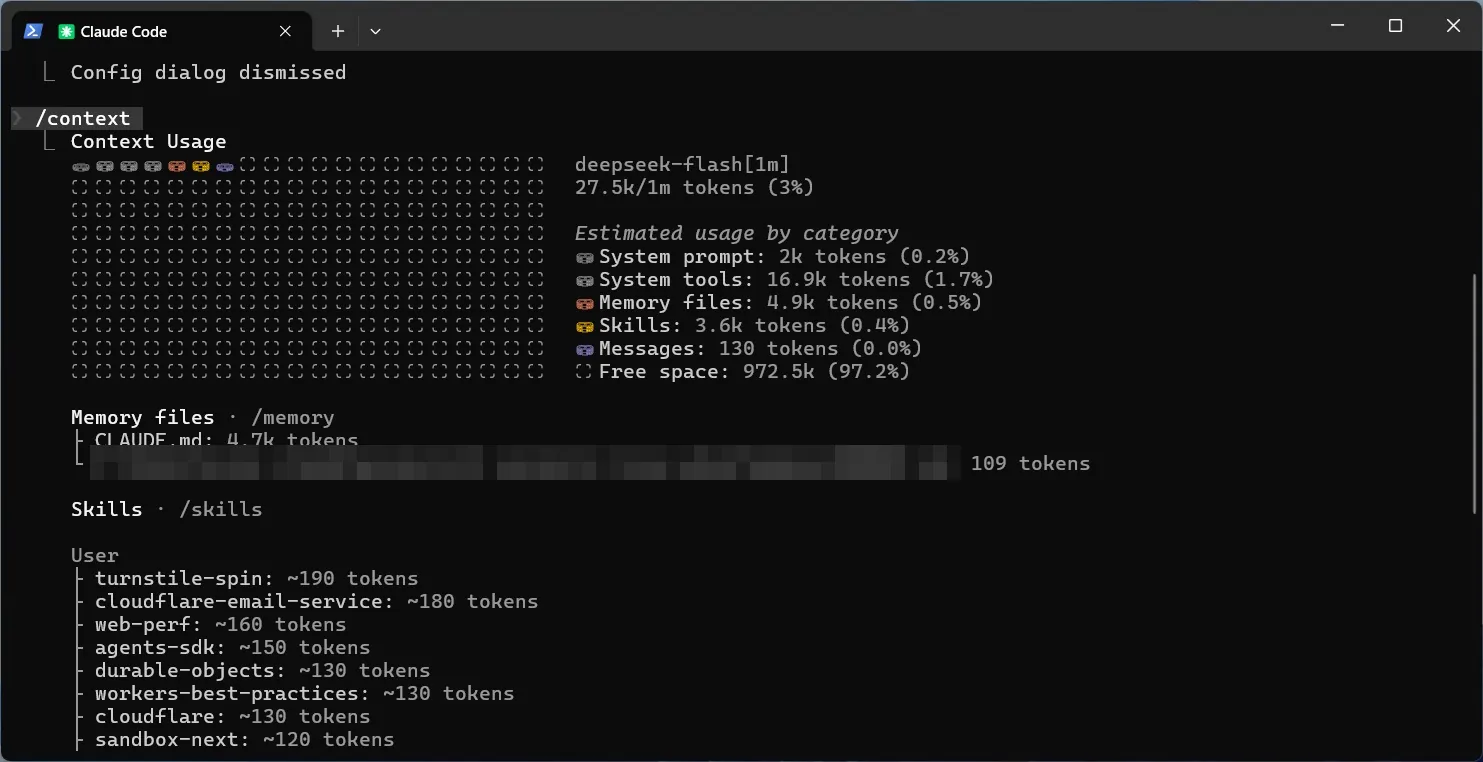
Copy-paste prompt if you want Claude to help interpret the screen:
I just ran /usage and /context. Based on what you see in this session,
list the top 3 cost drivers and one concrete change for each
(clear vs compact, disable an MCP, slim CLAUDE.md, switch model).
Do not rewrite code yet.
The 15 tactics
1. /clear between unrelated tasks
Anthropic’s own guidance: /clear is the highest-leverage move, and it costs nothing. Stale chat history is re-sent (often as cache reads) on every later turn.
Rule of thumb: if your next prompt would make sense in a brand-new terminal, clear first.
/rename oauth-debug
/clear
/rename first so you can /resume later. /clear cannot be undone.
2. /compact only when you must keep going
Use /compact mid-task when you need continuity. Tell it what to keep:
/compact Focus on the failing test output, the files we changed, and the open decisions. Drop exploratory file reads.Compaction itself is a large request because it reads the conversation it summarizes. Prefer /clear when you do not need the history. Prefer /rewind (or double-tap Escape) when you only want to drop the last few bad turns: rewind costs nothing and keeps the earlier prefix cacheable.
3. Compact before a long break, not after
Prompt cache lifetime is about an hour on a subscription (shorter once you are on usage credits / API). Summarizing while the cache is still warm is cheaper than coming back cold and re-processing the whole transcript. If you are stepping away for lunch, compact (or clear) before you leave.
4. Match the model to the job
Sonnet for most coding. Opus for hard architecture or multi-step reasoning. Haiku (or a smaller model on subagents) for noisy, bounded work.
/modelSet a sensible default in /config. A vague “improve this codebase” on Opus with a fat context is how solos burn a weekly window by Tuesday.
5. Lower effort / thinking when the task is simple
Extended thinking improves hard planning, but thinking tokens bill as output. For straightforward edits, lower effort with /effort or in /model, or adjust thinking in /config when the model allows it. Do not disable thinking on models that always use it.
6. Slim CLAUDE.md (and move rare workflows to skills)
CLAUDE.md loads every session. Detailed PR-review or migration playbooks that sit unused still cost tokens. Keep the always-on file under ~200 lines. Put specialized workflows in skills so they load on demand.
Related: CLAUDE.md templates for Next.js, Supabase and Stripe.
7. Prefer CLI tools over MCP when both exist
gh, aws, gcloud, and similar CLIs add almost no persistent tool listing. MCP servers still cost context even when tool bodies are deferred. Prefer CLI for GitHub/cloud chores you already know.
8. Disable MCP servers you are not using this hour
Run /mcp, disable anything idle, then re-check /context. Attribution in /usage now breaks out individual MCP servers (on recent Claude Code versions), so you can see which ones actually burn quota. If you are rebuilding your list, start from this minimal MCP server stack for Claude Code.
9. Filter noisy command output with hooks
A 10,000-line test log should never enter the main chat raw. A PreToolUse hook can rewrite npm test / pytest / go test to pipe through grep for failures. Official pattern lives in the costs docs; the idea is: Claude sees hundreds of tokens of failures, not tens of thousands of green lines.
10. Delegate verbose work to subagents
“Investigate auth refresh” in the main chat fills your window with file reads. Ask for a subagent so the verbose exploration stays in a child context and only a summary returns. Set model: haiku (or similar) on simple subagents when you configure them.
Agent teams are a different beast: each teammate has its own window. Keep teams small, shut them down when done, and remember they are off by default.
11. Write specific prompts
Vague: “improve this codebase.” Specific: “add input validation to login in auth.ts; run the existing auth unit tests.”
Specific prompts cut exploratory reads. Pair them with a verification target (test command, expected output, screenshot) so Claude does not burn a fix-up loop.
12. Plan first on multi-file work
Shift+Tab into plan mode for anything that touches several files. Approving a plan is cheaper than implementing the wrong approach twice. Skip planning for one-line renames.
13. Course-correct early (Escape, /rewind)
Stop the moment Claude heads the wrong way. After two failed corrections on the same issue, /clear and rewrite a better initial prompt with what you learned. Long “correction chat” is expensive and low quality.
14. Watch scheduled tasks and idle check-ins
/loop and other scheduled tasks keep sending your full context on an interval even while you are idle. Goal check-ins and cross-session messages can do the same. If /usage flags loops, kill or lengthen them. Set CLAUDE_CODE_GOAL_CHECKIN_MINUTES=0 if idle check-ins are eating quota.
15. Keep a cheap overflow lane for bulk text work
When you need to summarize huge logs, draft SEO outlines, or preprocess docs before a Claude Code session, a cheaper API model is often enough. DeepSeek is usually not the smartest option in that lane, but it is often the cheapest for bulk text. Use it to shrink inputs, then bring the distilled brief into Claude Code so your expensive context stays small. Save Claude Code for edits, tool use, and verification inside the repo.
A simple before / after workflow (do this once)
You do not need a lab. You need one real task measured twice.
- Pick a 20–30 minute task you do weekly (for example: fix a failing test, add a small API route).
- Session A: start from a messy long chat, leave unused MCP on, use your usual model. Note
/usagebefore and after. - Session B:
/clear, disable idle MCP, Sonnet (or cheaper) unless the task is architectural, specific prompt + test command. Note/usageagain. - Screenshot both
/usagescreens and drop them into this post when you publish (placeholder below).
What happened when I tried it. I ran this comparison on two runs of a similar real debugging task (diagnosing process crashes), once before trimming my setup and once after, in Claude Code using a DeepSeek model with a 1M-token context window. This is not a controlled benchmark: the two tasks were similar, not identical, so treat the numbers as a rough illustration rather than proof.
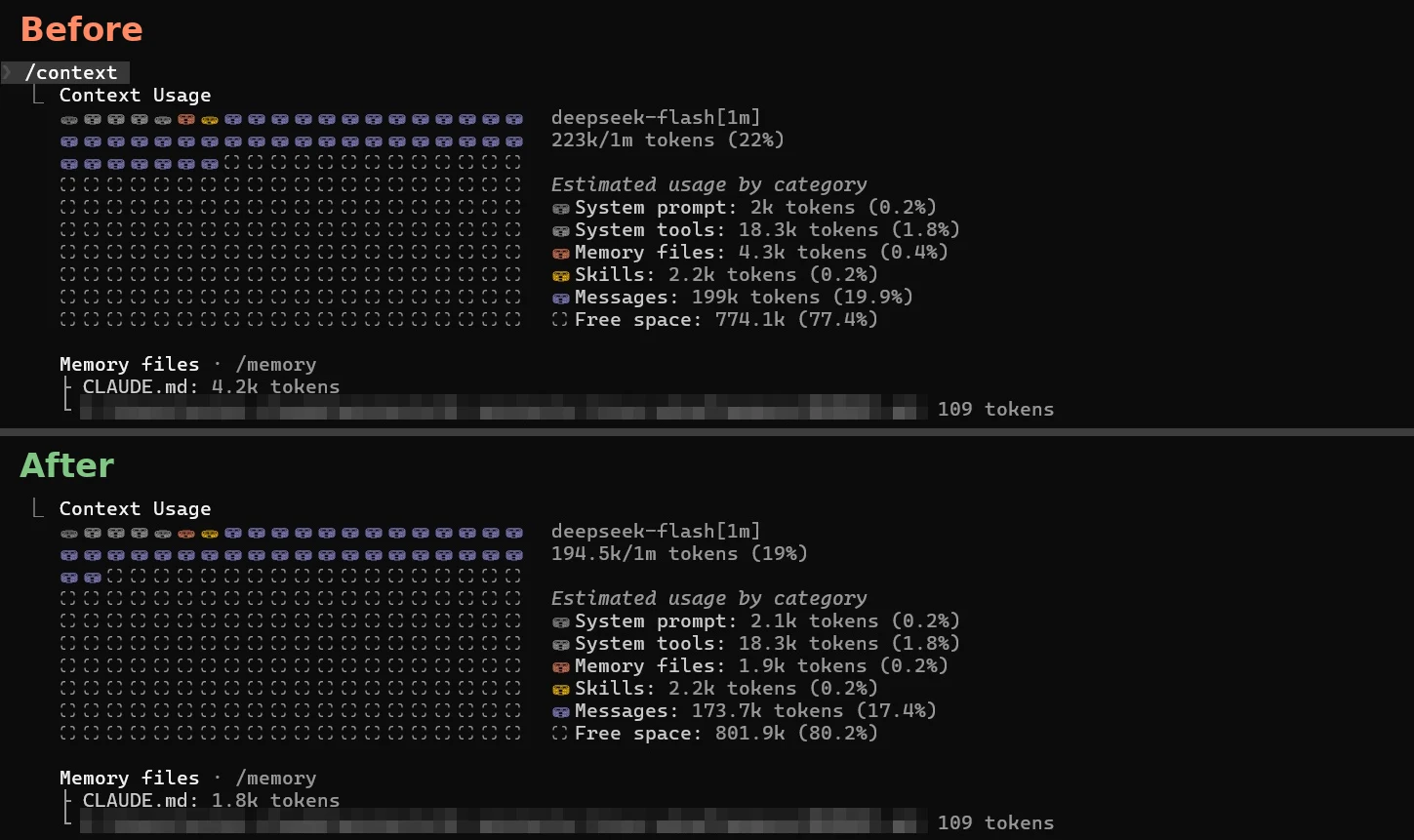
/context before vs. after: total context 223k → 194.5k tokens, CLAUDE.md 4.2k → 1.8k tokens.
/context suggestions: file reads fell from 76.6k to 51.8k tokens.| Metric | Before | After | Change |
|---|---|---|---|
| Context used | 223k | 194.5k | about 13% less |
| CLAUDE.md | 4.2k tokens | 1.8k tokens | about 57% less |
| File reads | 76.6k | 51.8k | about 32% less |
| Estimated cost* | $10.84 | $5.95 | about 45% less |
| Input tokens | 366.3k | 136.4k | about 63% less |
| Output tokens | 141.1k | 70.4k | about 50% less |
| Cache read | 11.0m | 7.0m | lower |
| API time | 20m 32s | 7m 57s | shorter |
*Cost is Claude Code’s own /usage estimate. It warns that costs may be inaccurate for models it doesn’t recognize (like this non-Anthropic model), so treat the dollar figures as approximate. The direction matches the token counts, though: the after run used noticeably less input and output.
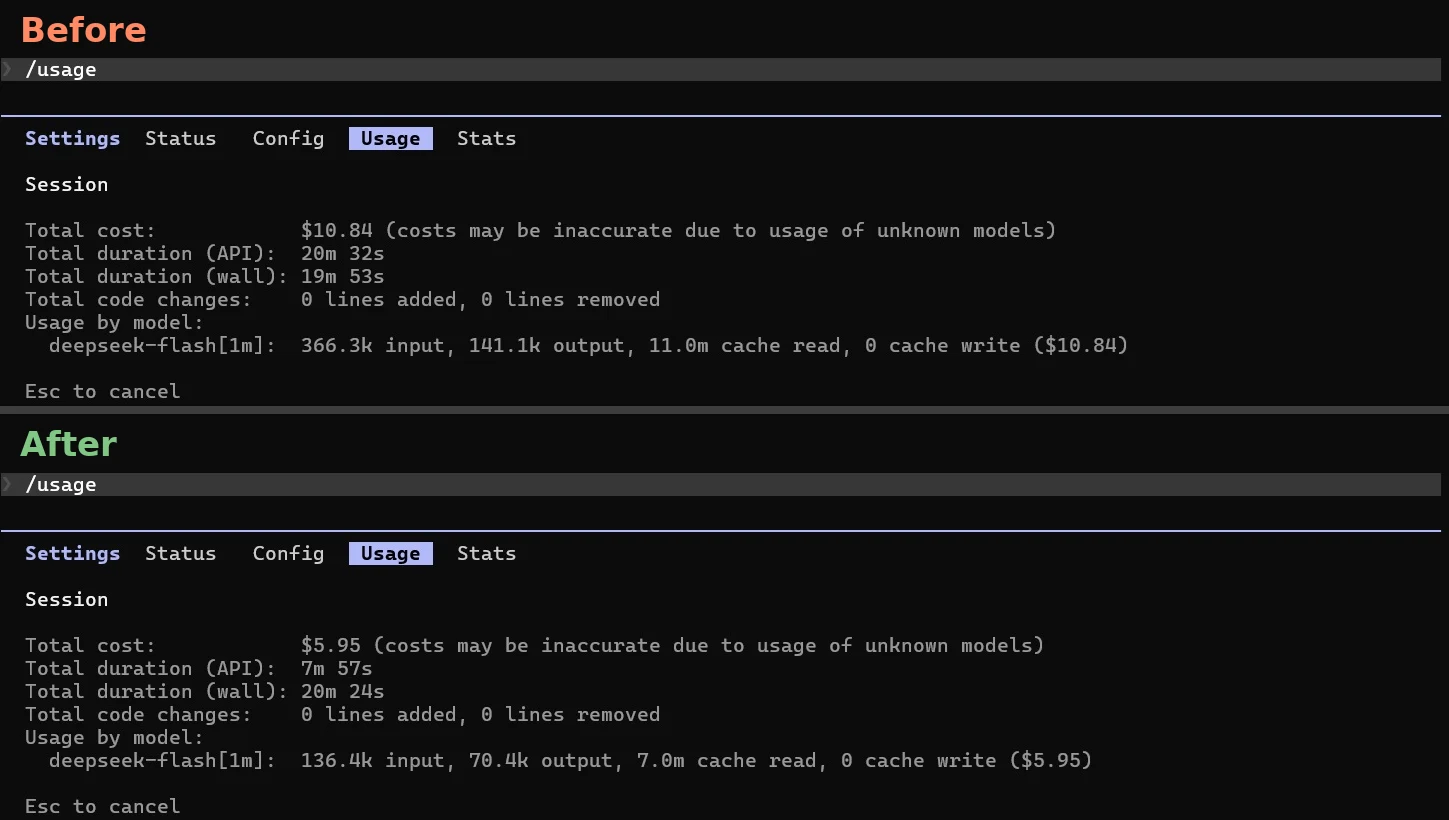
/usage before vs. after: estimated cost $10.84 → $5.95, input 366.3k → 136.4k, output 141.1k → 70.4k (Claude Code flags costs as possibly inaccurate for non-Anthropic models).Printable checklist
Before you start
- [ ]
/clearif the last task was unrelated - [ ]
/mcp: only servers you need this hour - [ ]
/model: Sonnet default; Opus only if justified - [ ]
CLAUDE.mdstill short (skills hold rare workflows)
During the session
- [ ] Specific prompts with a verification command
- [ ] Escape early when the path is wrong
- [ ] Subagents for noisy investigation
- [ ]
/compactwith instructions only when continuing the same task
When you pause or switch
- [ ]
/renamethen/clearfor a new task - [ ]
/compactbefore a long break if you must resume the same thread - [ ]
/usageif the plan bar moved more than you expected
Once per project
- [ ] Hooks to filter test output
- [ ] Code intelligence plugin for typed languages (fewer blind file reads)
- [ ] Review
CLAUDE.mdwith/doctorand cut anything Claude can infer from the repo
Common mistakes
**Treating /clear like a quota refill.** It only resets context. Your weekly bar does not move.
Compacting instead of clearing. Compaction costs a big request. Clear when the history is junk.
Leaving MCP “for later.” Deferred tool bodies help, but server instructions and names still sit in context. Disable idle servers.
One kitchen-sink session all day. Turn 40 re-reads turns 1–39. Several short sessions beat one marathon.
Giant always-on instructions. If Claude ignores a rule, the file is probably too long. Move the rare procedure to a skill or hook.
FAQ
**Does /clear reset my Max weekly limit?** No. It only starts a fresh conversation. Quota resets on Anthropic’s rolling windows (and usage credits are separate).
Is auto-compact enough? It prevents hard context walls, but it still summarizes a large history. Proactive /clear and smaller sessions usually beat waiting for auto-compact.
Should I turn off prompt suggestions? If you are near a limit, yes: suggestion requests reuse cache but still spend a little. Turn them off in settings when you are babysitting the bar.
API key vs Pro/Max: which advice changes? Context tactics are the same. On API you watch Console dollars (/usage session cost). On Pro/Max you watch plan bars and optional usage-credit spend. Unexpected API bills almost always come from never-cleared long sessions or Opus left as the default.
1 thought on “How to Reduce Claude Code Token Usage: 15 Tactics to Stop Hitting Your Limits”