Short answer: a good CLAUDE.md is a short operating manual for your repo, not a prompt essay. Keep it under about 200 lines, and fill it with the things Claude can’t work out by reading your code: exact commands, hard boundaries (secrets, auth, payments), your project’s odd conventions, and a definition of done. Below are three copy-paste templates (Next.js + Supabase + Stripe, Python/FastAPI, and a Chrome extension), a list of what to leave out, and a workflow for keeping the file useful as your project grows.
Last updated: October 14, 2026. Checked against Claude Code’s official memory and best-practices docs.
What CLAUDE.md is (and the 200-line rule)
Every Claude Code session starts with a fresh context window. CLAUDE.md is a plain markdown file that Claude Code loads at the start of every session, so you don’t have to re-explain your project each morning. You can put it in a few places:
| Location | Scope | Commit it? |
|---|---|---|
~/.claude/CLAUDE.md | Your personal defaults for every project | No (it’s on your machine) |
./CLAUDE.md or ./.claude/CLAUDE.md | The project, shared with anyone who clones it | Yes |
./CLAUDE.local.md | Your private notes for this project (sandbox URLs, test accounts) | No, add it to .gitignore |
subfolder/CLAUDE.md | Loaded on demand when Claude touches files in that folder | Yes |
Three facts from the official docs that most “ultimate CLAUDE.md” posts skip:
- It’s context, not configuration. Claude reads CLAUDE.md as a message and tries to follow it. Nothing enforces it. If something must never happen, like pushing to
mainor editing a migration, use a hook or a permission rule instead. - Target under 200 lines per file. That’s Anthropic’s own guidance. Longer files eat context and lower adherence.
@pathimports help you organize, but they don’t save tokens, because imported files also load at launch. - Verify it actually loaded. Run
/contextand look under Memory files. If your file isn’t listed, Claude can’t see it.
Bonus: block-level HTML comments (<!-- like this -->) are stripped before the file reaches Claude. They’re a free place to leave notes for human maintainers.
The 5 sections every CLAUDE.md needs
I read a lot of recent threads on r/ClaudeAI, r/ClaudeCode and Hacker News, and the strongest files people shared were short and opinionated. Almost all of them boil down to the same five sections:
- Project snapshot (2–4 lines). What the product is, the stack, and what’s intentionally out of scope. Don’t write a file-by-file tour.
- Commands. The exact install, dev, test, lint, typecheck and migration commands. Claude can’t guess whether you run
pnpm test,npm run test:unitorvitest run. - Hard rules / boundaries. Things that must never break: where secrets live, how auth is checked, which folders are generated or off-limits.
- Conventions that differ from the defaults. Only the ones where your project deviates from what a strong model would do anyway.
- Definition of done. What Claude has to run and show you before it says “done.” This one section does more for quality than everything else combined.
A useful filter that kept coming up in those threads: does this line tell Claude something it can’t learn by reading the repo? If not, delete it. Anthropic’s version of the same test is “Would removing this cause Claude to make mistakes?”
Template 1: Next.js + Supabase + Stripe SaaS
This is the stack most indie SaaS projects and vibe-coded MVPs end up on, and it’s where AI agents make the most expensive mistakes. Community audits keep surfacing the same three: a Supabase admin key reaching the browser, tables without Row Level Security, and Stripe webhooks that return 200 OK but never update the database. The template turns each of those into an explicit, checkable rule.
Replace everything in <angle brackets>, and delete rules that don’t apply to you.
# <ProductName>

<One sentence: what it does and for whom.>
Stack: Next.js (App Router, TypeScript strict) · Supabase (Postgres, Auth, Storage) · Stripe (Checkout + Billing) · Tailwind · deployed on Vercel.
Out of scope for now: teams/orgs, i18n, mobile app.

## Commands
- Install: `pnpm install` (pnpm only, never npm or yarn)
- Dev: `pnpm dev` → http://localhost:3000
- Typecheck: `pnpm typecheck` · Lint: `pnpm lint` · Tests: `pnpm test` (single file: `pnpm test path/to/file`)
- DB migration: `supabase migration new <name>`, then `supabase db reset` locally
- Regenerate DB types after any schema change: `pnpm db:types` (writes `src/types/database.ts`, never hand-edit)
- Stripe webhooks locally: `stripe listen --forward-to localhost:3000/api/stripe/webhook`

## Layout (only the non-obvious parts)
- `src/lib/supabase/server.ts`: server client (cookies, user context). `client.ts`: browser client.
- `src/lib/supabase/admin.ts`: the ONLY place the secret/service-role key is used. Server-only.
- `src/app/api/stripe/webhook/route.ts`: the single Stripe webhook entry point.
- `supabase/migrations/`: append-only. Never edit a migration that is already committed.

## Security rules (non-negotiable)
- IMPORTANT: The Supabase secret / service-role key never goes in client components, `NEXT_PUBLIC_*` variables, logs, or tests. Import `admin.ts` only from webhooks, cron jobs and server-only admin routes.
- Never "fix" an empty query by switching to the admin client. Fix the RLS policy instead.
- Every new table gets RLS enabled + policies in the same migration that creates it.
- Server-side auth decisions use a verified user (`supabase.auth.getUser()` or `getClaims()`), never `getSession()` alone.
- Roles and plan/paid status come from `app_metadata` or a server-written table, never `user_metadata` or anything the client can write.
- Never trust prices, plan IDs or user IDs sent from the browser. Look them up server-side.

## Stripe rules
- Subscription state comes from webhooks, not from the checkout success redirect.
- Webhook handler: read the raw body with `await req.text()`, verify with `stripe.webhooks.constructEvent`, then process.
- Idempotency: store `event.id` in `stripe_events` (unique constraint) and skip duplicates.
- For every handled event, state which table/row/column changes. A handler that only logs and returns 200 is a bug.
- Handled events: `checkout.session.completed`, `customer.subscription.updated`, `customer.subscription.deleted`, `invoice.payment_failed`.

## Conventions
- Server Components by default. Add "use client" only for interactivity.
- Mutations go through Server Actions in `src/app/**/actions.ts`, with input validated by zod.
- Reuse components in `src/components/ui/` before creating new ones.
- Write package names in backticks in this file (e.g. `@supabase/ssr`) so they aren't parsed as imports.

## Workflow
- For changes touching auth, billing or migrations: plan first, wait for my OK, then implement.
- Keep diffs scoped to the task. No drive-by refactors.
- Ask before adding a dependency, a new SaaS vendor, or a new deploy target.

## Definition of done
1. `pnpm typecheck && pnpm lint && pnpm test` pass, and you show me the output.
2. Schema changed → migration added, types regenerated, RLS policies included.
3. Billing changed → list the DB writes per Stripe event and test with `stripe trigger <event>`.
4. Summarize: files changed, what you did NOT do, anything I need to configure manually (env vars, dashboard settings).
That’s about 60 lines, well under the 200-line budget. Two notes on why it’s written this way:
- **The
IMPORTANTis used once, on purpose.** Anthropic’s docs suggest emphasis for the one rule Claude keeps skipping. If you put it on every line, none of them stands out. - **Supabase is moving from
anon/service_rolekeys to publishable (sb_publishable_...) and secret (sb_secret_...) keys.** The rules above are written so they apply to either naming. Update the env var names in your own file to match what your project actually uses.
Optional: move Stripe rules into a path-scoped rule
If your billing section grows, move it into .claude/rules/billing.md with a paths frontmatter. It then loads only when Claude touches billing files, so it doesn’t take up context in every session:
---
paths:
  - "src/app/api/stripe/**"
  - "src/lib/billing/**"
---

# Billing rules
- Raw body + constructEvent before anything else.
- Dedupe on event.id. Name the DB write for every event.
Template 2: Python / FastAPI API
Same five sections, much shorter, because Python tooling is more standard. The point is to pin the tools you actually chose (uv vs pip, Ruff vs Black, Alembic). Otherwise Claude will drift toward whatever showed up most often in its training data.
# <ServiceName> API

FastAPI service that <does X>. Python 3.12, managed with uv. Postgres via SQLAlchemy 2.0 (async) + Alembic. Deployed as a Docker container.

## Commands
- Install/sync: `uv sync` (never `pip install` directly)
- Run: `uv run fastapi dev app/main.py`
- Tests: `uv run pytest -q` (single test: `uv run pytest tests/test_x.py::test_name`)
- Lint + format: `uv run ruff check --fix . && uv run ruff format .`
- Types: `uv run mypy app`
- New migration: `uv run alembic revision --autogenerate -m "<msg>"`, then review the generated file before applying

## Rules
- Pydantic v2 models live in `app/schemas/`; SQLAlchemy models in `app/models/`. Never return ORM objects from endpoints.
- All DB access goes through `app/repositories/`. No queries inside route functions.
- Secrets come from `app/config.py` (pydantic-settings). Never read `os.environ` elsewhere, never hardcode keys.
- Every endpoint that touches user data checks ownership. Add a test proving user A can't read user B's data.
- Never edit an applied Alembic migration. Create a new one.

## Definition of done
- ruff, mypy and pytest pass, and you paste the summary lines.
- New endpoint → test for the happy path and one auth failure.
- Tell me which env vars or migrations I need to run in production.
Template 3: Chrome extension / small side project
For weekend projects, the risk isn’t security debt but scope creep and drifting off the platform rules. Keep it tiny:
# <ExtensionName>

Chrome extension (Manifest V3) that <does X>. TypeScript + Vite. No backend.

## Commands
- `pnpm dev` (builds to `dist/` with watch) · `pnpm build` · `pnpm test`
- Load unpacked from `dist/` in chrome://extensions to test manually

## Rules
- Manifest V3 only: service worker in `src/background.ts`, no persistent background pages, no remote code.
- Request the minimum permissions. Ask me before adding any permission or host permission to `manifest.json`.
- Store data with `chrome.storage.local`. No external analytics or network calls without asking.
- Keep it small: no UI framework. Plain TS + CSS in `src/popup/`.

## Definition of done
- `pnpm build` succeeds with no warnings, and you tell me exactly what to click to test the change manually.
Twenty-odd lines is fine. A side project doesn’t need a constitution.
What NOT to put in CLAUDE.md
The most common mistake in shared CLAUDE.md files is that they’re far too long. Here’s what to cut, and where it should go instead:
| Don’t put this in CLAUDE.md | Put it here instead |
|---|---|
| Generic advice (“write clean code”, “follow best practices”) | Nowhere. The model already does this. |
| Directory trees, dependency lists, file-by-file tours | Nowhere. Claude can read the repo, and /doctor flags this content for removal. |
| Formatting and lint rules | Your linter/formatter config, plus a hook that runs it |
| Multi-step procedures (release, deploy, writing a changelog) | A skill in .claude/skills/, which loads only when needed |
| Rules for one folder or file type | .claude/rules/*.md with paths, or a nested CLAUDE.md |
| “Never do X” where X would be a disaster | A hook or permissions.deny. CLAUDE.md is advisory. |
| API keys, passwords, customer data | Never. The file is committed and read by an AI agent. |
| Current task notes, TODOs, “where we left off” | A separate PROGRESS.md or plan file you point to when needed |
| Code snippets copied from your codebase | A pointer like “see src/lib/billing/checkout.ts“. Copies go stale. |
One opinion: a lot of popular “mega” CLAUDE.md files are cargo cult. They’re 400 lines of personality instructions that would be better spent on ten lines about your project. A borrowed generic file is a fine starting point for ~/.claude/CLAUDE.md. It’s a poor substitute for project facts.
Pitfall: accidental imports
CLAUDE.md treats @path as an import. If you write a scoped npm package like @supabase/ssr outside backticks, Claude Code may try to read it as a file. Wrap package names and any literal @ text in backticks. Imports inside code spans and fenced code blocks are skipped.
How to evolve it (/init, the “#” key, and “when Claude gets it wrong twice”)
Start with /init, then cut
Run /init in an existing repo. Claude scans the codebase and drafts a CLAUDE.md with the commands and conventions it finds. If a file already exists, it suggests improvements instead of overwriting it. Then delete half of it: anything Claude found by reading the code, it can find again. Keep only what it couldn’t discover. If you’d like a guided version, set CLAUDE_CODE_NEW_INIT=1 before running /init. It then asks follow-up questions and can also propose skills and hooks.
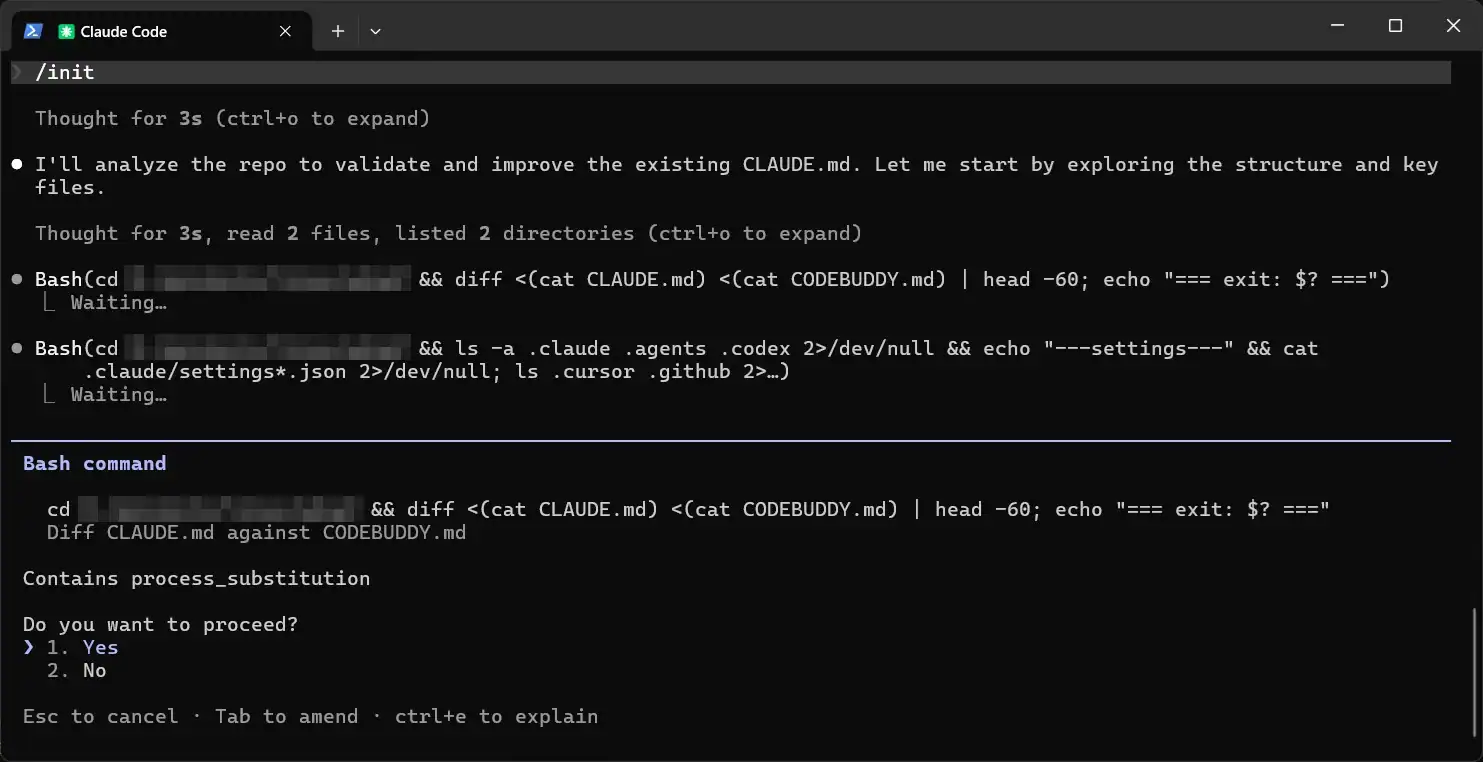
Already have Cursor rules, .github/copilot-instructions.md or an AGENTS.md? /init pulls the relevant parts in. (AGENTS.md is read with CLAUDE_CODE_NEW_INIT=1 set.)
The “#” shortcut is gone
Lots of older tutorials say to start a message with # to save a memory. That shortcut was removed in Claude Code v2.0.70 (December 2025). Today a message starting with # is just a normal message. Use one of these instead:
- Say it directly: “Add this to CLAUDE.md under Security rules: …”
- Run
/memoryto open the right file in your editor. - Or let auto memory handle preferences. If you say “remember I prefer pnpm,” Claude saves it to its own memory folder, not your CLAUDE.md. Keep hard project rules in CLAUDE.md, where they’re versioned and reviewable.
The two-strikes rule
Don’t try to write the perfect file on day one. Add a line when:
- Claude makes the same mistake a second time,
- you type the same correction you typed last session, or
- a review catches something Claude should have known about this codebase.
The official docs list these same triggers. One more tip: if you’ve corrected Claude twice inside one session, run /clear and restart with a better prompt. Then add the lesson to CLAUDE.md so the next session starts with it.
Here’s a prompt you can paste at the end of a messy session:
Review this session. List the corrections I had to give you more than once,
and any project fact you had to discover the hard way. For each, propose one
concrete line for CLAUDE.md (or say if it belongs in a hook, a skill, or
.claude/rules/ instead). Keep the whole file under 200 lines. Show me a diff;
don't write it yet.
Prune monthly
Treat CLAUDE.md like code. Once a month:
- Run
/doctor prompt-audit(Claude Code v2.1.283+). It flags outdated instructions, references to files that no longer exist, and contradictions between CLAUDE.md, rules and AGENTS.md, then proposes edits without changing anything yet. - Delete rules Claude now follows without being told.
- Check
/statusfor warnings about oversized instruction files.
Using Codex or Cursor too?
Since v2.1.277, Claude Code reads AGENTS.md when there’s no CLAUDE.md in your project. If you have both, CLAUDE.md wins by default. The setup most people on Hacker News settled on is to keep shared rules in AGENTS.md and make CLAUDE.md a thin wrapper:
@AGENTS.md

## Claude Code only
- Use plan mode for anything under `src/app/api/stripe/`.
A dedicated CLAUDE.md vs AGENTS.md comparison, covering which tool reads what, is coming next on this blog.
Where this fits in the bigger workflow
CLAUDE.md is the foundation of the “development & coding” stage in my complete AI-powered workflow for building indie products. If you’re setting up a new project, read that first for the end-to-end picture, then come back and drop in the template for your stack.
FAQ
What is the best CLAUDE.md template?
The best one is short and specific to your stack. Start with the five sections above (snapshot, commands, hard rules, conventions, definition of done), fill them from one of the three templates, and stay under about 200 lines. A generic 500-line file from GitHub usually does worse than a 50-line file about your actual project.
How long should a CLAUDE.md file be?
Anthropic recommends targeting under 200 lines per CLAUDE.md file. Claude Code will technically load much larger files, but adherence drops as the file grows. Move folder-specific rules to .claude/rules/ with paths, and move procedures into skills.
Should I commit CLAUDE.md to GitHub?
Yes, commit the project CLAUDE.md so every session (and every collaborator or CI agent) gets the same rules. Keep personal stuff in CLAUDE.local.md and add that to .gitignore. Never put secrets in either file.
Does Claude Code always follow CLAUDE.md?
No. It’s loaded as context, not enforced. Vague, conflicting or buried rules get ignored most often. Make rules concrete and checkable, check /context to confirm the file loaded, and use hooks or permission rules for anything that must never happen.
Do I need both CLAUDE.md and AGENTS.md?
Only if you use more than one coding agent. Claude Code can read AGENTS.md on its own when there’s no CLAUDE.md. If you need Claude-specific rules too, create a CLAUDE.md that starts with @AGENTS.md and add the extras below it.
1 thought on “CLAUDE.md Template for Indie SaaS Projects (Copy-Paste Examples for Next.js, Supabase & Stripe)”